Showing posts with label Skypeweb. Show all posts

Saturday, March 10, 2007

Easy Skype Status in Flash

After my post Flash Skype Status Part III I've received emails from some of my readers asking me for help as they couldn't understand 100% the whole process.
When I did the experiment in September last year, I didn't take into account many things and just continued playing with Flash, php and the XML from SkypeWeb.
To avoid confusion, let's see how to show in Flash my Skype Status in a simple way:

First of all, be sure you have the the latest SKYPE installed

Then follow one of the two options below:

TEXT ONLY
- Open a new Flash document
- Select the Text tool and put a dynamic text field on the stage with instance name "myStatus" as shown in the picture


- on a new layer, write the following actionscript:

function loadXML(loaded:Boolean):Void {
if (loaded) {
my_status = this.firstChild.firstChild.childNodes[2].childNodes;
attachStatus();
} else {
trace("XML not loaded!");
}
}
xmlData = new XML();
xmlData.ignoreWhite = true;
xmlData.onLoad = loadXML;
xmlData.load("http://mystatus.skype.com/myID.xml");
function attachStatus():Void {
myStatus.text = my_status
}


You would need to change myID for your actual Skype ID, ie echo123
- Test your movie pressing ctrl+enter, your Skype status should be shown in the text field.
*There is still a problem: "cross-domain" policy. I will explain how to avoid it later on.

If you want to know more about XML and Flash, please follow this link.

ADDING INTERACTIVITY
If you want to show different images depending on your status and let users interact with you, then follow this steps:
- Open a new Flash document
- As there are 6 different status, you should have already 6 different images. Import them all into your document and create a movieclip for each of them


- The most important thing here is to put an identifier name to each of them; to do that, right click on the MovieClips in the Library and select "linkage" and write as Identifier the exact name of each status, for instance "Do Not Disturb"


- You might have noticed already that in the library there is a seventh movieclip called "loader_mc". So we need to put an instance of this empty movieclip on the stage and the stage will have nothing else but our "loader_mc" that in fact is empty!


- on a new Layer write the following code:
function loadXML(loaded:Boolean):Void {
if (loaded) {
my_status = this.firstChild.firstChild.childNodes[2].childNodes;
attachStatus();
} else {
trace("XML not loaded!");
}
}
xmlData = new XML();
xmlData.ignoreWhite = true;
xmlData.onLoad = loadXML;
xmlData.load("http://mystatus.skype.com/myID.xml");
function attachStatus():Void {
loader_mc.attachMovie(my_status, "status", 1);
}

You would need to change myID for your actual Skype ID, ie echo123
- Test your movie pressing ctrl+enter, your Skype status should be shown on your movie.
- We can as well add a script to allow any visitor to contact us when pressing the movieclip. To do that just add the following actionscript:

loader_mc.onPress = function() {
getURL("skype:myID?chat");
};


People can have a chat with you through Skype if you're online or leave a message if you're not.
There are more options and all of them are explained on the Advanced Skype Links.

CROSS-DOMAIN POLICY
Cross domain in flash is when data from X website is loaded into a movie on another website with different domains; for security reasons, Flash Player is only allowed to do that under certain circumstances. To read more about Flash Player Security Sandbox, click here.
As the data we are trying to load is served by skype.com, we would need to by-pass the cross-domain policy; we can do that using a php script:


<?php
header("Content-type: text/xml; charset=utf-8");
echo file_get_contents($_GET["proxy_url"]);
?>
Save this script as proxy.php and upload it to your server.

- Now we need to change one line on our actionscript, so instead of

xmlData.load("http://mystatus.skype.com/myID.xml");


we will write
xmlData.load("http://domain.com/proxy.php?proxy_url=http://mystatus.skype.com/myID.xml");

- Remember to change myID for your actual Skype ID and domain.com for your own domain address.

The good thing about this php file is that we can use it on different projects, for example you can load the RSS feed from my blog just writing:
http://domain.com/proxy.php?proxy_url=http://overloadstudios.blogspot.com/feeds/posts/default

and it will appear as if the data is served from a different domain.

That's it!
This post is similar to Flash Skype Status Part III, however is more detailed and both the actionscript and php files are optimized.

salut!

Wednesday, November 22, 2006

Flash Skype Analogue Clock

From the Skype Status Flash Button came the idea of having your Skype status shown on an analogue clock. So there it is, your skype status shown in the middle of this Skype Clock.
If you click on it, your Skype application will open giving you the option to start a conversation with me (or the person hosting the clock...)
Feel free to put it on your website, just copy and paste the following code on your html:

<object classid="clsid:d27cdb6e-ae6d-11cf-96b8-444553540000" id="skype_clock" width="96" codebase="http://fpdownload.macromedia.com/pub/shockwave/cabs/flash/swflash.cab#version=7,0,0,0" height="96" align="middle">

<
param value="always" name="allowScriptAccess"/>
<
param value="http://overloadstudios.co.uk/ewa/skype_clock.swf?myID=yourSkypeID" name="movie"/><param value="high" name="quality"/><param value="transparent" name="wmode"/><embed pluginspage="http://www.macromedia.com/go/getflashplayer" quality="high" allowscriptaccess="always" align="middle" type="application/x-shockwave-flash" height="96" src="http://overloadstudios.co.uk/ewa/skype_clock.swf?myID=yourSkypeID" width="96" wmode="transparent" name="skype_clock"/>
<
/embed></object>

As the previous Skype Status Flash Button, the only change you will need to do is to replace "yourSkypeID" for your skype user name or ID (allowing before your status to be shown)
Preview:


Enjoy!

Wednesday, November 15, 2006

Free Skype Status Flash button

Celebrating the recent release of Skype 3.0 beta and following my "flash skype status part 1, part 2 and part 3" previous posts, there it is my latest widget: a free Skype Status flash button.
The flash movie has two functionalities:
- shows your skype status
- it opens skype to start a conversation with you
If you want to use it, just copy and paste the following code onto your html page:

<object classid="clsid:d27cdb6e-ae6d-11cf-96b8-444553540000" id="skype_me" width="130" codebase="http://fpdownload.macromedia.com/pub/shockwave/cabs/flash/swflash.cab#version=7,0,0,0" height="40" align="middle">

<
param value="always" name="allowScriptAccess"/>
<
param value="http://overloadstudios.co.uk/ewa/skype_me.swf?myID=yourSkypeID" name="movie"/><param value="high" name="quality"/><param value="transparent" name="wmode"/><embed pluginspage="http://www.macromedia.com/go/getflashplayer" quality="high" allowscriptaccess="always" align="middle" type="application/x-shockwave-flash" height="40" src="http://overloadstudios.co.uk/ewa/skype_me.swf?myID=yourSkypeID" width="130" wmode="transparent" name="skype_me"/>
<
/embed></object>

The only change you will need to do is to replace "yourSkypeID" for your skype user name or ID (and of course, allow your status to be shown)


Any feedback is very welcomed.

-- IMPORTANT UPDATE --

I've changed the dimensions of the skype flash button.
If you are using it, please edit your page acordingly.
New dimensions: width="130" height="40".

I've uploaded two widgets to Widgetbox:
- Flash Skype Status
- Skype Analogue Clock (with Skype status)

Please use the ones at Widgetbox instead.
-------------------------------

Salut!

Friday, September 29, 2006

Skypeweb bug


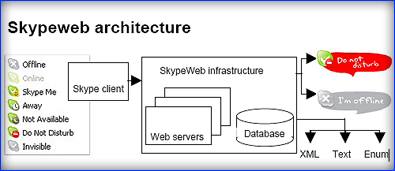
Reading the SkypeWeb developer notes, I have confirmed that only and if only I have my computer on, the SkypeWeb server will be able to get my status and then will create the respective XML, image and text.
I think is a bug because from my point of view, my computer doesn't need to be on to allow the SkypeWeb servers to detect my status.
why?
well, the XML I'm using to get my online status and show it in a flash movie, is created "upon request" but if the computer is off, the SkypeWeb server can not create any XML as no data was collected from my computer, therefor it returns an old XML, the last one generated that might be wrong.
I'm wondering why is not created in such way that if no data is retrieved then generates an XML showing the "offline" option...

Thanks to altrove and chespi for their feedback and help on this matter.
And please guys at the Skype forums, do you mind confirming this issue?
Is Skypeweb still beta?

salut!