Showing posts with label Skype. Show all posts

Saturday, March 10, 2007

Easy Skype Status in Flash

After my post Flash Skype Status Part III I've received emails from some of my readers asking me for help as they couldn't understand 100% the whole process.
When I did the experiment in September last year, I didn't take into account many things and just continued playing with Flash, php and the XML from SkypeWeb.
To avoid confusion, let's see how to show in Flash my Skype Status in a simple way:

First of all, be sure you have the the latest SKYPE installed

Then follow one of the two options below:

TEXT ONLY
- Open a new Flash document
- Select the Text tool and put a dynamic text field on the stage with instance name "myStatus" as shown in the picture


- on a new layer, write the following actionscript:

function loadXML(loaded:Boolean):Void {
if (loaded) {
my_status = this.firstChild.firstChild.childNodes[2].childNodes;
attachStatus();
} else {
trace("XML not loaded!");
}
}
xmlData = new XML();
xmlData.ignoreWhite = true;
xmlData.onLoad = loadXML;
xmlData.load("http://mystatus.skype.com/myID.xml");
function attachStatus():Void {
myStatus.text = my_status
}


You would need to change myID for your actual Skype ID, ie echo123
- Test your movie pressing ctrl+enter, your Skype status should be shown in the text field.
*There is still a problem: "cross-domain" policy. I will explain how to avoid it later on.

If you want to know more about XML and Flash, please follow this link.

ADDING INTERACTIVITY
If you want to show different images depending on your status and let users interact with you, then follow this steps:
- Open a new Flash document
- As there are 6 different status, you should have already 6 different images. Import them all into your document and create a movieclip for each of them


- The most important thing here is to put an identifier name to each of them; to do that, right click on the MovieClips in the Library and select "linkage" and write as Identifier the exact name of each status, for instance "Do Not Disturb"


- You might have noticed already that in the library there is a seventh movieclip called "loader_mc". So we need to put an instance of this empty movieclip on the stage and the stage will have nothing else but our "loader_mc" that in fact is empty!


- on a new Layer write the following code:
function loadXML(loaded:Boolean):Void {
if (loaded) {
my_status = this.firstChild.firstChild.childNodes[2].childNodes;
attachStatus();
} else {
trace("XML not loaded!");
}
}
xmlData = new XML();
xmlData.ignoreWhite = true;
xmlData.onLoad = loadXML;
xmlData.load("http://mystatus.skype.com/myID.xml");
function attachStatus():Void {
loader_mc.attachMovie(my_status, "status", 1);
}

You would need to change myID for your actual Skype ID, ie echo123
- Test your movie pressing ctrl+enter, your Skype status should be shown on your movie.
- We can as well add a script to allow any visitor to contact us when pressing the movieclip. To do that just add the following actionscript:

loader_mc.onPress = function() {
getURL("skype:myID?chat");
};


People can have a chat with you through Skype if you're online or leave a message if you're not.
There are more options and all of them are explained on the Advanced Skype Links.

CROSS-DOMAIN POLICY
Cross domain in flash is when data from X website is loaded into a movie on another website with different domains; for security reasons, Flash Player is only allowed to do that under certain circumstances. To read more about Flash Player Security Sandbox, click here.
As the data we are trying to load is served by skype.com, we would need to by-pass the cross-domain policy; we can do that using a php script:


<?php
header("Content-type: text/xml; charset=utf-8");
echo file_get_contents($_GET["proxy_url"]);
?>
Save this script as proxy.php and upload it to your server.

- Now we need to change one line on our actionscript, so instead of

xmlData.load("http://mystatus.skype.com/myID.xml");


we will write
xmlData.load("http://domain.com/proxy.php?proxy_url=http://mystatus.skype.com/myID.xml");

- Remember to change myID for your actual Skype ID and domain.com for your own domain address.

The good thing about this php file is that we can use it on different projects, for example you can load the RSS feed from my blog just writing:
http://domain.com/proxy.php?proxy_url=http://overloadstudios.blogspot.com/feeds/posts/default

and it will appear as if the data is served from a different domain.

That's it!
This post is similar to Flash Skype Status Part III, however is more detailed and both the actionscript and php files are optimized.

salut!

Saturday, December 30, 2006

My first desktop widget!


Some time ago I asked the guys at the Widgipedia to open a section for web widgets but as the Widgipedia is still in beta, they told me:
Flash widgets are coming soon, as part of our goal to host "the best widgets and gadgets across any platform"
so I continue with my web widgets and put them in Widgetbox.
On the last day at Flash on The Beach I was the lucky winner of a MDM Zinc copy which allows you to create desktop applications from flash including screensavers and WIDGETS!
So I did my very first desktop widget today, after few days trying to understand the tool that for any strange reason doesn't like vector images... and uploaded it to the Widgipedia!

It is a very simple Skype Analogue Clock but I think is cool, specially because is my first desktop widget :)

Salut!

Wednesday, November 22, 2006

Flash Skype Analogue Clock

From the Skype Status Flash Button came the idea of having your Skype status shown on an analogue clock. So there it is, your skype status shown in the middle of this Skype Clock.
If you click on it, your Skype application will open giving you the option to start a conversation with me (or the person hosting the clock...)
Feel free to put it on your website, just copy and paste the following code on your html:

<object classid="clsid:d27cdb6e-ae6d-11cf-96b8-444553540000" id="skype_clock" width="96" codebase="http://fpdownload.macromedia.com/pub/shockwave/cabs/flash/swflash.cab#version=7,0,0,0" height="96" align="middle">

<
param value="always" name="allowScriptAccess"/>
<
param value="http://overloadstudios.co.uk/ewa/skype_clock.swf?myID=yourSkypeID" name="movie"/><param value="high" name="quality"/><param value="transparent" name="wmode"/><embed pluginspage="http://www.macromedia.com/go/getflashplayer" quality="high" allowscriptaccess="always" align="middle" type="application/x-shockwave-flash" height="96" src="http://overloadstudios.co.uk/ewa/skype_clock.swf?myID=yourSkypeID" width="96" wmode="transparent" name="skype_clock"/>
<
/embed></object>

As the previous Skype Status Flash Button, the only change you will need to do is to replace "yourSkypeID" for your skype user name or ID (allowing before your status to be shown)
Preview:


Enjoy!

Wednesday, November 15, 2006

Free Skype Status Flash button

Celebrating the recent release of Skype 3.0 beta and following my "flash skype status part 1, part 2 and part 3" previous posts, there it is my latest widget: a free Skype Status flash button.
The flash movie has two functionalities:
- shows your skype status
- it opens skype to start a conversation with you
If you want to use it, just copy and paste the following code onto your html page:

<object classid="clsid:d27cdb6e-ae6d-11cf-96b8-444553540000" id="skype_me" width="130" codebase="http://fpdownload.macromedia.com/pub/shockwave/cabs/flash/swflash.cab#version=7,0,0,0" height="40" align="middle">

<
param value="always" name="allowScriptAccess"/>
<
param value="http://overloadstudios.co.uk/ewa/skype_me.swf?myID=yourSkypeID" name="movie"/><param value="high" name="quality"/><param value="transparent" name="wmode"/><embed pluginspage="http://www.macromedia.com/go/getflashplayer" quality="high" allowscriptaccess="always" align="middle" type="application/x-shockwave-flash" height="40" src="http://overloadstudios.co.uk/ewa/skype_me.swf?myID=yourSkypeID" width="130" wmode="transparent" name="skype_me"/>
<
/embed></object>

The only change you will need to do is to replace "yourSkypeID" for your skype user name or ID (and of course, allow your status to be shown)


Any feedback is very welcomed.

-- IMPORTANT UPDATE --

I've changed the dimensions of the skype flash button.
If you are using it, please edit your page acordingly.
New dimensions: width="130" height="40".

I've uploaded two widgets to Widgetbox:
- Flash Skype Status
- Skype Analogue Clock (with Skype status)

Please use the ones at Widgetbox instead.
-------------------------------

Salut!

Monday, October 02, 2006

voIP phone & skype 2.5


Fantastic!
that's the only word in my mind now.
I just finished a phone conversation with my colleagues Carmen & Eric and before I talked to my mate Robinson and everything for free!
Yes, I know, these are old news but personally I never had the chance to actually phone anyone as I had no microphone but today arrived to my office my new voIP-USB phone.
As soon as I came home, I started playing with it, not before installing the brand new Skype 2.5 that was released just few days ago.
I can not wait to phone my friends and family from my country!
but now is midnight here and tomorrow I've got to go to work...

nite nite :)

Friday, September 29, 2006

Skypeweb bug


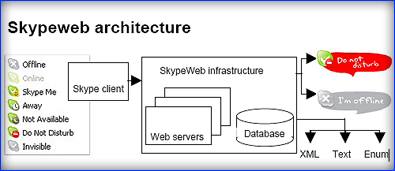
Reading the SkypeWeb developer notes, I have confirmed that only and if only I have my computer on, the SkypeWeb server will be able to get my status and then will create the respective XML, image and text.
I think is a bug because from my point of view, my computer doesn't need to be on to allow the SkypeWeb servers to detect my status.
why?
well, the XML I'm using to get my online status and show it in a flash movie, is created "upon request" but if the computer is off, the SkypeWeb server can not create any XML as no data was collected from my computer, therefor it returns an old XML, the last one generated that might be wrong.
I'm wondering why is not created in such way that if no data is retrieved then generates an XML showing the "offline" option...

Thanks to altrove and chespi for their feedback and help on this matter.
And please guys at the Skype forums, do you mind confirming this issue?
Is Skypeweb still beta?

salut!

Friday, September 15, 2006

Flash Skype Status - Part III


My friend Sebastian Recabarren pointed me out a little problem about my Skype Status flash widget. He asked me who was lying or his Skype or my blog.
Browser's cache memory!
I though this problem was only when the user goes online through a proxy server, which keeps everything in its cache, but seems like flash always takes the image from the browsers cache even if there is no proxy server in between.
To avoid this problem, we can use an XML provided by SkypeWeb instead of loading the image.
The XML is available from:
http://mystatus.skype.com/userID.xml

That data is easy to pull from flash and then show the right status attaching the right movieclip.
What I did is, instead of

image01.loadMovie("http://mystatus.skype.com/smallclassic/yourID");

I'm loading the XML as follows:

function loadXML(loaded:Boolean):Void {
if (loaded) {
xmlNode =
this.firstChild;
my_status = xmlNode.childNodes[0].childNodes[2].childNodes;
attachStatus();
}
else {
trace("XML not loaded!");
}
}
xmlData =
new XML();
xmlData.ignoreWhite =
true;
xmlData.onLoad = loadXML;
xmlData.load("http://mystatus.skype.com/myID.xml");
function attachStatus():Void {
image01.loader_mc.attachMovie(my_status,"status",1)
}

I have added 6 movieclips showing the different possible status, each of them have a linkage identifier name depending on the status. To add an identifier to a movieclip just right click on it (in the library) and select "linkage properties", tick the "Export for actionscript" option and change the identifier to its equivalent skype status, ie: Not Available
Voila!
Testing locally everything works fine.
But, as usual when debugging, there is a new problem: cross domain policies.
Due to security reasons, any online flash application cannot load data from a different server and my experiment doesn't work online.
My mate Stephen Downs (Tink) pointed me out the solution:

It is possible to get round the sandbox by loading the XML into some PHP or something on your server and then loading it into Flash from there. Tricks the player into thinking your serving it


and my colleague Thomas Van Steenwinckel gave me a hand with the php and together we put the following script on my server:

<?
header("Content-type: text/xml; charset=utf-8");
$filename = "http://mystatus.skype.com/myID.xml" ;
$dataFile = fopen($filename, "r" );
if ( $dataFile )
{
while (!feof($dataFile))
{
$buffer = fgets($dataFile, 4096);
echo $buffer;
}
fclose($dataFile);
}
else
{
die( "fopen failed for $filename" ) ;
}
?>

Now on flash I'm loading the XML created by this php instead of the one provided by skypeWeb and my blog shows the right status of my Skype account.
Nice way to get rid of the cross domain issues.

PD: Just in case, remember to update to the latest Skype.

Salut!

-- IMPORTANT UPDATE --
Part I
Part II
Free Skype Status Flash Button

and the latest one of this series:
Easy Skype status in Flash
---------

Friday, September 08, 2006

Flash Skype Status - Part II


Ok, now I've got my Skype status shown on my website but... what?
does anyone know my Skype ID? can anyone then call me? or at least start a conversation with me?
Yes they can, we need to add only a couple of lines to our actionscript to allow people to interact with us, if we have the latest Skype
There is one limitation, we have no control on the image as it comes from the Skype server so we can't add animation...
well, actually we can!

What I did is, I created another movieclip inside of my already existent "image01" movieclip and called it (instance name) "loader_mc".
If we want our movieclip to move 1 pixel when the mouse is over, we need to update our script as follows:

image01.loader_mc.loadMovie("http://mystatus.skype.com/smallclassic/myID");
image01.onRollOver = function() {
this._y += 1;
};
image01.onRollOut = function() {
this._y -= 1;
};

and if we want an event to happen when the user clicks on the icon, we just add:

image01.onPress = function() {
getURL("skype:myID?chat");
};


so people can have a chat with me through Skype if I'm online or leave a message if I'm not.
There are more options and all of them are explained on the Advanced Skype Links.

Hey! there are many things to experiment with using Skype and Actionscript, just go for it! for example, I added a sound and a little colour effect when rolling-over.

By the way, if anyone reading this knows of any colour syntax plug-in for blogger, please let me know!

Salut

-- IMPORTANT UPDATE --
Part I
Part III
Free Skype Status Flash Button

and the latest one of this series:
Easy Skype status in Flash
---------

Wednesday, September 06, 2006

Flash Skype Status - Part I


The other day, reading my mate Elmer Zinkhann's blog I noticed he has a little Skypes icon showing his status.
I went to the Skype's website and after following a couple of links and adding a bit of my creativity, I ended up with a little flash that shows my status and allows you to start a chat with me if I'm online or leave me a message if not.
What I did is as follows:

Apart from being sure you have the latest SKYPE installed,

- First, allow your status to be shown on the web, following these simple instructions.
- Then select the look the button will have using the skype buttons wizard.
- When getting the code, paste the javascript bit on the html page that has the swf embeded
- The image address is what you will use in flash to show your status.
- Create a very small new movie in flash, mine is 120 x 50 pixels.
- Create a movieclip and give it an instance name, ie "image01".
- In the first frame of your movie add the following actionscript:

image01.loadMovie("http://mystatus.skype.com/smallclassic/yourID");

And that's it!
of course, you will change the image address you got when using the skype buttons wizard.
Upload your swf to your server and embed it into the html page you need to display it.

Bear in mind that if you are behind a proxy, the image will not update properly as flash loads the image from the cache.

Salut!

-- UPDATE --
Part II
Part III
Free Skype Status Flash Button

and the latest one of this series:
Easy Skype status in Flash
---------