Tuesday, June 05, 2012

New Game: Binkos

I've just released a new game: Binkos.

Background.
Back in 2007 I started working for Gamesys, specifically in the Bingo team. After more than 2 and a half years of working and speaking only about bingo, bingo balls and bingo calls I decided to move companies.
My time in Gamesys was great, I met and worked with lots of nice people, many of them were really talented and to pay my respects I created Binko.
As you can see, some typical elements in a bingo game are there: 90 bingo balls, a dabber and a jackpot. The idea was to hit the jackpot to get a prize, randomly selected from 6 prizes (one for each member of my team).
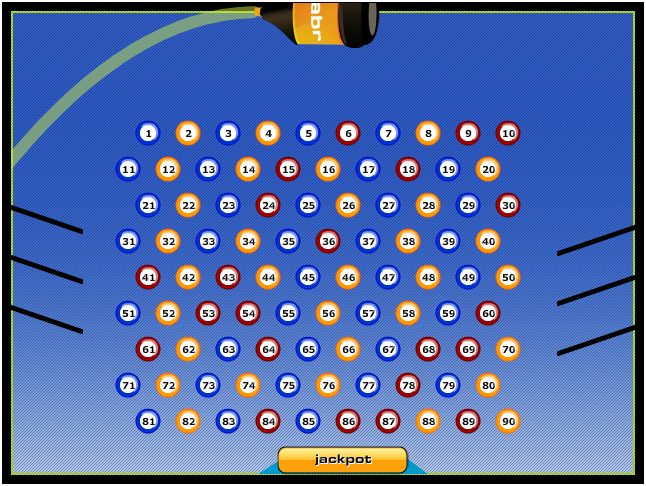
Bingo is dead. Long live Binko!


Many people might think the game is just another Peggle's clone, however, I was actually inspired by Players Plinko, one of the first mini-games I worked on in Gamesys but I won't deny there's an obvious Peggle influence as well.


That was just over 2 years ago, so yeah, the game engine is a bit old already. 

Revamp.
Last year while having a chat with one of my current work-mates (Zuzanna Kucharska) I mentioned the game and talked to her about FlashGameLicense.
She started working on the graphics, I updated the code and a few months later we had Binkos ready to be sold.

 
Despite the fact she did a great job, the game couldn't get any bid higher than $500 with some bids as ridiculously low as $80.
This is an early stages video of Binko's game-play:

First there was only one background and the player would have 25 balls to start with. Later on we added particle effects, different backgrounds for the 5 different levels (from late night to early morning) and the number of balls changed to 7 per level, carrying over any balls not used in previous levels.
After about 6 months we tried the Quick Auction option with the same results. Pathetic low bids.
We couldn't sell the game, so, I decided to release it as a Games-Garden game.

Release.
The first site I uploaded the game to is obviously Games-Garden.
Now the game has been released in:
- Newgrounds.
- Kongregate.
- Mindjolt.
Some other websites have taken the file from Newgrounds already so the viral distribution has already started.
I'll be releasing a Mochiads version of the game soon and see how it goes.

Tech-talk.
Some of the 3rd party libraries I used in Binkos are Box2D library for the physics in the game. Tweener, as usual, for all other animations like the boat going from side to side, points update, etcetera. Flint Particles library for the particle effects when the ball hits the tokens. Playtomic for the game analytics. Leaderboards are from MochiMedia and of course I'm using CPMStar and MochiAds for in-game advertising.

Now, if you're curious about the game and haven't played it yet, go and play Binkos at Games-Garden.

Sunday, December 11, 2011

Widget: iClock

More than 3 years ago I decided to move from developing small applications and left the 'widgetsphere' to focus more in the casual games industry. I created Games-Garden, a facebook app and a bunch of games.
These days my mode has changed a bit and I don't feel like spending all of my spare time creating games which might be played only a few thousand times. The competition is too big and there are lots of 'pirates' stealing games (specially from China) which is not fun at all.
So, I've decided to go back to create these small apps known as widgets. The first one I'm releasing is this iClock. Similar to the Digital Time and Date widget that I created more than 5 years ago, which by the way it has been cloned many times already, the iClock shows the time in a 12 hours format and as well it shows the date when moving your mouse over the small calendar icon which shows the day. The graphics obviously have a big influence from the iDevices and so far it looks like people like it. What do you think?


Personally I think is nice :)
I had the idea of creating a similar widget many years ago when at my previous job I worked on a countdown and these days the idea came back after my current task at work includes a copy of that old countdown. So yeah, it looks like everything is a remix... :D

Wednesday, November 09, 2011

Sound spectrum visualizer

I know I'm a bit late for playing with the AS3 sound API but I never had the chance to check it out before until some time this year and specially in recent days as I got the flu and haven't had much to do when at home (my girlfriend doesn't want to catch it so she's sleeping in another room and I'm not allowed out of this room...).
Anyway, after playing a bit with the SoundMixer class, and adding basics Flint particles in the background (yeah, some default example), I ended up with a small flash visualizer and uploaded to YouTube.
 

I think it looks cool, plus I love the song, Deckers Theme by Dom & Roland.
The base of the code can be found at this old post from Mike Chambers. I advise you to play a bit with the code, you can get some really nice results. And by the way, it's never too late to learn new stuff ;)

Monday, November 07, 2011

New Game: Emotiblocks

Just had a quick look at my forgotten blog (yes, the one you're on now) and noticed it's been a while since I mentioned any of my works.

Well, I've been busy doing games and other experiments mixing many technologies as usual.
Anyway, I want to introduce you to my latest released game: Emotiblocks.

It's a match 3 type of game with power-ups and 1 minute levels.
If you don't feel like playing it now, maybe this video from early development stages will tease you enough to try it for yourself:


And if in case you feel like adding it to your site, just download the .zip file from Games Garden 'Games for your site'.

Sunday, August 07, 2011

Flash Games Event: Mochi London 2011

Mochi London 2011
Mochi London 2011 is a FREE 2-day Flash games event taking place on August 27th-28th, 2011 in central London.

It has been brought to you by members of the Mochi Media community, Mochi London will bring local and international people together to share insights and experiences about the Flash games market. We're calling at:

  • Flash game developers
  • Flash game artists and designers
  • Flash game publishers
Whether you live or work in England or anywhere else in the United Kingdom, or even elsewhere in Europe, this event will be well worth the trip. Mochi community members Chris Jeffrey (ChrisJeff) and myself are organizing the event, with support provided by Mochi Media.

Come and join us! it will rock!
The speakers include:
  • Iain Lobb (freelance Flash / ActionScript developer)
  • Stuart Allen (developer of Gravitee Wars)
  • Martine Spaans (Ubisoft, formerly of SPIL Games)
  • Michael Hudson (ActionScript developer, CodeHeads)
  • Merlin Gore (Flash developer, FlashGameLicense.com)
  • Mike Jones (Platform Evangelist, Adobe Systems)
Don't forget to register and find out more at the Registration Page.

Monday, July 04, 2011

Google+ first impressions


I've been testing this new Google+ thing just to see what is about. Not that I'm excited about social-networks at all but I love technology.
By the way, this is not a full review nor anything like that, just a quick 'first impressions' on my experience so far using it.
First of all, as they are in close beta testing getting the invite was a pain!
After a friend found a 'hack' or a workaround to send invites, I managed to get into 'the circles'.
Inviting people is even a bigger pain!
Seems like even with this workaround, they allow only a limited number of people to join every day so, so far I got 1 friend! woohoo!! :D
I like the clean look of it and how it divides streams into 'circles' so you can choose the people who will read your message, only family, only friends, etcetera... nice! but there are loads of steps just to publish a simple 'hello mum'.

The circles idea reminds me of Wallop, a social-network made 100% in flash by Microsoft back in 2006 which I think it fail for 2 reasons: their greediness and the flash-o-phobia people had back in that time. It was way too advanced for those days :)

By the way, I don't think many companies will restrict the access to google.com so accessing to Google+ in a sub-domain is a good idea, http://plus.google.com, or bad idea from a business perspective... I'm sure companies will find a workaround to block access to it as soon as it becomes popular (if ever).

Tuesday, November 30, 2010

Extending AS3 trace

On a previous post (debugging spaghetti code) I mentioned it's important to know where a specific function is being called.
From Adobe, this is the description of what the function trace does:
Displays expressions, or writes to log files, while debugging.
We can trace anything anywhere in our code, however, as mentioned before, how do we know where? we could then specify this in each trace call, for example:
trace('MyClass - ' + someValueToTrace);
trace('MyClass - ' + someOtherValue);
Right, instead of writing the object's name in every call, we could have a private function to do this:
private function debug(objectToTrace : Object) : void
{
trace('MyClass' + objectToTrace);
}
Then, instead of calling 'trace(blah)' we use 'debug(blah)' which will include the class name. For example:
debug(someValue);
// outputs: 'MyClass - someValue'
Advantages? well, if in case we don't want to trace anything any more, we just comment out the 'trace' line in our code rather than deleting every single call to debug in that class...

Cool! now we know where are we using 'trace'.

Can we extend it? sure thing! and this is my solution:

- Create a class in your utils package, name it Debug.as.
- Create a static function to trace the name of the caller plus any parameter.
Code:
package com.mysite.core.utils
{
import flash.utils.getQualifiedClassName;

public class Debug
{
/**
* // Writes in the flashlog the name of the object calling this function and any number of parameters

* Debug.print(this, someValue, someOtherValue);
*/
public static function write(caller : Object, ...arguments) : void
{
var objectString : String = getClassName(caller);
trace(objectString + ' - ' + arguments);
}

private static function getClassName(object : Object) : String
{
var className : String = getQualifiedClassName(object);
return className.slice(className.lastIndexOf('::'));
}

}

}
If we don't use the second function (getClassName), the output would be '[object MyClass]' so that's why we slice a string to get only the very class name.
Now you can call Debug.write instead of trace in the debug function on every class:
private function debug(objectToTrace : Object) : void
{
Debug.write(this, objectToTrace);
}
// use debug(objectToTrace) instead of trace(objectToTrace)
Sweet! :)

Friday, November 05, 2010

A poor man's Currency Formatter

*Title stolen from Arthur Debert Tweener tips.

While the Adobe flash.globalization package is still in beta, which includes a CurrencyFormatter class, we need to find a quick way to display an amount formatted as currency, with thousand separator and decimal mark.
In this case, we are targeting USA and UK so the thousand separator is a comma and the decimal mark is a point.
Right, so this is some simple logic used:
  • multiply the number by 100 to get the decimals
  • check if new number is zero or less than 100 (if less than 100 then is a decimal)
  • otherwise get the decimals and keep them aside
  • divide the rest of the number into groups of three and push them into an array
  • reverse the array and add the decimals
  • voila! you got the number formatted as currency!
So, yeah, the commas in that separate elements in the array work now as thousand separators :)
And here is the code:
private function formatCurrency(amount : Number) : String
{
var newAmount : String = String(Math.round(100 * amount));

if (newAmount.length == 1) newAmount = '0';

else if (newAmount.length == 2) newAmount = '0.' + newAmount;

else
{
var decimals : String = '.' + newAmount.slice(-2);
newAmount = newAmount.substring(0, newAmount.length - 2);

var amountGroup : Array = new Array();
while (newAmount.length > 3)
{
amountGroup.push(newAmount.slice(-3));
newAmount = newAmount.substring(0, newAmount.length - 3);
}
amountGroup.push(newAmount);
amountGroup.reverse();
newAmount = (Number(decimals) > 0) ? (amountGroup.join() + decimals) : amountGroup.join();
}
return newAmount;
}

Oh well, it does the job and as the CurrencyFormatter from Adobe is not implemented YET in pure AS3 (Flex Builder 4*), that code is useful :)

Salut!

*The CurrencyFormatter supported in Flex SDK 4.1 works with MXML only.

Thursday, November 04, 2010

Debugging spaghetti code

spaghetti-code

As a programmer, sometimes you find yourself dealing with this nasty badly written code and your task is to fix some even nastier and ugly looking bugs.

Whether is code you wrote yourself some years ago or someone else's (which makes it even worse) as it's your task to dig into the code, you will need help, help to understand where in heaven one of the dozens of public methods in that class is being called.

Yeah, in that code, almost all the methods in all the classes (including the main one) are public and of course is highly coupled making it almost impossible to read or to maintain.

Spaghetti code, hundreds of messy lines of 'code' (?) in each messy class... oh the joy...
After hours of work, after cursing everyone around you, you find the function which is causing the issue but... where is it being called? who's calling it? why?
Here it comes Stack Trace to the rescue! woohoo!
And the line of actionscript 3 that has saved me from cursing even the ones that are not around me is:

trace(new Error().getStackTrace());

That line will output in the flashlog the path (including class names, and code lines) that the thread takes before throwing the error (you will need flash player debugger to see the error). Now we now where the function is being called, time to continue debugging...

*Image taken from SpreadShirt.co.uk.

Sunday, June 28, 2009

Widget: Play Random Game

I mentioned this widget on my previous post however I think it deserves it's own post.

I've made this widget in order to improve Games-Garden Bounce Rate and to allow people to discover games they might have not played before or might have forgotten about.

This is the widget's description:
Do you want to discover the best games on the web? this button lets you find them and takes you to a different game every time!


The general idea is to keep users (players or visitors) for as long as possible on your site and Games-Garden offers different options for it which include showing the top 15 games and other games in the same category so when people get bored of playing the same game they can choose similar games.
However having an option to play a game in a sort of "blind date" I think could do a better job.

Give the widget a go, I'm sure you will find a cool game behind :)

Tuesday, June 23, 2009

Widgetbox business model is not good for devs

Play Random Game

I just added a new widget to Widgetbox and noticed something I'm actually not happy with:

A widgets developer HAS to pay to avoid Widgetbox hijack his/her widget and inject ads...

What?

To be honest, I don't remember if this "feature" was already there in February when I added my first Flex Widget (Newest Games) but I today when my widget Play Random Game was approved I got an email encouraging me to upgrade to Pro and after checking, this is one of the benefits:

- No ads on widgets you develop or install

I just don't get it!
- We create content for them for free
- They use our content for Marketing adding a button with a link back to Widgetbox (which is fair as they are distributing the widgets)
- They add ugly ads covering our widgets without our approval
- They monetize with these ads without any revenue share option for us devs
- We MUST pay if we don't want to see the ads (???)

I think the idea of charging users if they don't want to see the "get widget" button is good but adding ads without sharing revenue with the devs and on top of that asking devs for money so the ads are not shown IS JUST PLAIN WRONG!

Very bad Widgetbox, very very bad. I wonder how much they make from widgets like my Flash Date Calendar which gets 50k+ views a day?

This makes me think about moving my widgets with other distributors...

salut!

Monday, June 22, 2009

Inspiration: Flash and meow

I just added a new link on my blog roll: Zoltan Bornemissza.

Zoltan is the new Lead Flash Developer from my team at work and I had a chance to check his blog which is full of cool stuff!

Flash and meow

I recommend you to play with the fractal experiments and get some inspiration :)

salut!

Sunday, February 01, 2009

Widget: Newest Games

Taking the same "feed" from Games-Garden Latest Games as the one used for the Featured Games Widget but displayed in a different way, this is my first Flex Widget:

Newest Games


I haven't uploaded it into any widgets distributor yet as I still haven't found a way to pass variables into the widget (to change colours for example) so at the moment there's no design but the default components skin from Flex 3.

I must say I love how easy is to work with Flex and my new homework is to do some changes in the PHP side of Games Garden to create an API that will provide feeds for most of the different categories of the site. The next one is "Top Players" which I won't be releasing as a widget as is only important in the website itself.

Play around with Newest Games and play some games as well! come on, you deserve a 5 minutes break ;)

Tuesday, January 27, 2009

Widget: Featured Games

Back in business! :)


Killing 2 birds with the same stone I've created this widget called "Featured Games" which pulls .xml data from Games Garden, parses it and shows it as an "iTunes" like widget.

What are these Featured Games anyway?
well, almost everyday I add a couple of new games to Games Garden and PHP creates the .xml for this so to be honest the widget should be called "Games Garden Latest Games" but... you know... a bit of marketing ;)
The games added are hand picked so only the best games make it to Games Garden and therefore to the widget.
The widget shows the game name and a game icon which you can double click to go to Games Garden and play that specific game, otherwise just click on the "Play Game" button that does the same trick (gets you to play the game).

Just if in case anyone is interested...
What's going on in my life?
well, since I opened Games Garden I've been extremely busy learning PHP & MySQL, making more flash games (I'll speak about them later) and learning Flex (expect my first Flex widget soon!)

Anyway, give Featured Games a go, play some games and if you like the widget, add it to your site ;)

cheers!

Tuesday, June 10, 2008

Flash Security Policy Server


With the introduction of Flash Player 9.0.115.0 another issue came out when trying to make a socket connection to a server.
Before the release of this Flash Player version the use of a crossdomain.xml would deal with the loading of external data into a flash application, however, Adobe decided to change these security policy as explained on this document.

To fix this issue, Syed Meerkasim, a Senior Java Developer from where I work has released a Flash Security Policy Server created in JAVA that you can download for free from this link.

His new website, Flash Resources, will be updated on a regular basis so I advice you to keep an eye on it ;)

salut!

Thursday, June 05, 2008

Games Garden public beta release

games-garden

Games Garden, has finally opened to the public after a week of private beta testing.
The website is still in beta so expect some minor bugs and take into account that some components will eventually be moved around; the casual games portal will be adding more and more features these coming days including free downloadable games and widgets.

Quoting from the site:
Welcome to Games Garden, a games portal which offers you the latest games that you can play, share, and bookmark for whenever you feel like taking a break and have some fun!

At the moment you don't need to register to play as any new visitor has 200 tokens which is enough to play many of their games :)
All the games are powered by MochiAds, meaning, are completely free to play and are good quality "sponsored" games.
Thanks to MochiAds, games developers are getting some extra cash from their work and effort which is helping the games developers community to grow up producing better quality games as they are now able to afford different tools to improve them.

If you want to know more about what Games Garden has to offer, check out the ABOUT US section.

salut!

Thursday, May 15, 2008

Tweener for games: Updating Amounts

Following up on the Tweener for games tutorials, this time we will see how to update amounts gradually using Tweener to make them look nice & smooth.

As an example we can see my game GAIA - Guess Who? where the score is updated gradually instead of in one step (immediately) adding more to the user's experience and making the game more playable and enjoyable. Trust me, these little details can make a difference ;)

Update amounts gradually using Tweener:
What I've got on stage is a dynamic textfield with instance name "txtScore".
To give it a value, we declare a variable called myScore:

var myScore : Number = 100;
txtScore.text = myScore;

If you run the movie, your txtScore shows 100.
Nothing exiting I know... :P

Because we need to update this amount when a certain event happens, then we add a button, we will call it mcAddBonus.
Now let's use tweener to update the score adding a 50 points bonus:

import caurina.transitions.Tweener;

var myScore : Number = 100;
txtScore.text = myScore;

mcAddBonus.onRelease = function() : Void
{
Tweener.addTween(this._parent, {myScore:myScore + 50, time:1, onComplete:function() { txtScore.text = Math.round(myScore); }});
}


Testing the movie, whenever we press our button after a second myScore updates by 50.
Still nothing special :(
but, how about if we use the tweener onUpdate parameter instead of onComplete?
the onComplete only updates our score when the tween has finished but as we saw on the previous example, onUpdate updates the value gradually before the tween finishes.
Let's change the code:

import caurina.transitions.Tweener;

var myScore : Number = 100;
txtScore.text = myScore;

mcAddBonus.onRelease = function() : Void
{
Tweener.addTween(this._parent, {myScore:myScore + 50, time:1, onUpdate:function() { txtScore.text = Math.round(myScore); }});
}


Sweet!
I must say I love Tweener, is a great tool :)
and this is the example:


salut!

Saturday, May 10, 2008

Flash Games Contest: 5th place

Gaia - Guess Who?
To be honest I was a bit too positive about this one and I was expecting to get one of the first 3 prizes, however, there were 200+ games and many of them were really good, so 5th place is not bad at all ;)

The contest: MochiAds & Gaia Online - Become a Rock Star.

Actually there were two categories:
- Rock Star Winners
- Gaia Audience Prizes

and my game Gaia - Guess Who? won the 5th place of the Gaia Audience Prizes category.

I must say my game Gaia - Guess Who? is not the best but I was positive because I actually participated with 3 games altogether:
- Gaia - Guess Who?
- Save the Ants
- Pawel & the Teutonic Castle
Anyway, I'm really happy I've won a prize on this contest :)

For more info check out the "Become a Rock Star" Flash Game Contest winners' page.

salut!

Wednesday, April 23, 2008

Social timelines: Timetoast released


Using Adobe Flex as front end and Ruby on Rails as backend technology, here it comes Timetoast, a new web 2.0 site that you should keep an eye on.
From their press room:
LONDON, England - April 22, 2008 - Timetoast, the new web-based timeline
creation application, launches it’s service to the public today.
Timetoast.com is a web application that allows people to create interactive
timelines, which they can share anywhere on the web. Anyone can join and
start creating and sharing their own timelines, all they need is a valid email
address. It's also completely free.
Timetoast.com was built on top of powerful open-source frameworks and technologies
such as Ruby on Rails, MySQL and Adobe Flex


You don't even need to sign-up if in case you want to check the public timelines. However, you would need to fill in a small form (only 4 fields) to become a member and start creating your own time-lines.
By default your timelines will be saved as "drafts" that later on you can change this status into "public" allowing the world to see them.
One of the cool features is that there's RSS feeds everywhere! even each timeline has its own feed; this is great if in case you want to create a mash-up application or let's say widgets showing these data...

So, if in case you want to track a project, share the story of your life, your dog, your relationship... or tell others what you know about your favourite artist using a timeline, go and sign-up.

Salut!

Piranha-Loca-timeline

Tuesday, April 15, 2008

Tweener for games: Countdown

Last week I came back from holidays, I was back in my home country after almost 6 years since I left, that's why I couldn't update the blog...
Anyway, as mentioned before, I'll be writing some tutorials on how to use Tweener for games development, however, take into account that the code can be used on other applications as well...
The first "tutorial" is

Creating a countdown using Tweener

From my point of view, adding a countdown to a game helps to improve the playability as the user feels more challenged to finish certain task.
After reading Arthur Debert's Tweener Tips, I got the idea on developing further his "Poor's man timer":

Tweener.addTween(this, {time:0.3, onComplete: myFunction});

Right, so if we put it into a function, then we have:


var timeleft : Number = 30;

function tweenDown() : Void
{
trace(timeleft);
timeleft--;
Tweener.addTween(this, {time:1, onComplete:tweenDown});
}

tweenDown();


First we declare a variable called "timeleft" and set it to 30, so we will count down from 30 seconds to 0.
The function tweenDown() traces the updated "timeleft", decreases the timeleft value by one and using tweener it calls itself every second thanks to the onComplete parameter.

If we tide up a bit, we can add another function to trace the updated value of timeleft, then we have something like:

var timeleft : Number = 30;

function showTimeleft() : Void
{
trace(timeleft);
}

function tweenDown() : Void
{
timeleft--;
Tweener.addTween(this, {time:1, onUpdate:showTimeleft, onComplete:tweenDown});
}

tweenDown();


The function showTimeLeft() will trace the updated value of timeleft thanks to the parameter onUpdate and this allow us to do something else instead of only tracing; we can add a textfield (with instance name txtTime) to show us the updated timeleft value and the updated script would be:

var timeleft : Number = 30;

function showTimeleft() : Number
{
return txtTime.text = timeleft;
}

function tweenDown() : Void
{
Tweener.addTween(this, {time:1, onUpdate:showTimeleft, onComplete:tweenDown});
}
tweenDown();


Now, the problem is that when the countdown reaches 0, it doesn't stop!
so we can add another function to check if there's any "timeleft" and if there isn't, then do something else. The final script for a simple countdown is:

import caurina.transitions.Tweener;

var timeleft : Number = 30;

function showTimeleft() : Number
{
return txtTime.text = timeleft;
}

function tweenDown() : Void
{
Tweener.addTween(this, {time:1, onUpdate:showTimeleft, onComplete:countDown});
}

function countDown() : Void
{
if(timeleft > 0){
timeleft--;
tweenDown();
} else {
trace("GAME OVER!");
Tweener.removeAllTweens();
}
}

tweenDown();


and this is the example:


Salut!