Showing posts with label Personal. Show all posts

Tuesday, June 05, 2012

New Game: Binkos

I've just released a new game: Binkos.

Background.
Back in 2007 I started working for Gamesys, specifically in the Bingo team. After more than 2 and a half years of working and speaking only about bingo, bingo balls and bingo calls I decided to move companies.
My time in Gamesys was great, I met and worked with lots of nice people, many of them were really talented and to pay my respects I created Binko.
As you can see, some typical elements in a bingo game are there: 90 bingo balls, a dabber and a jackpot. The idea was to hit the jackpot to get a prize, randomly selected from 6 prizes (one for each member of my team).
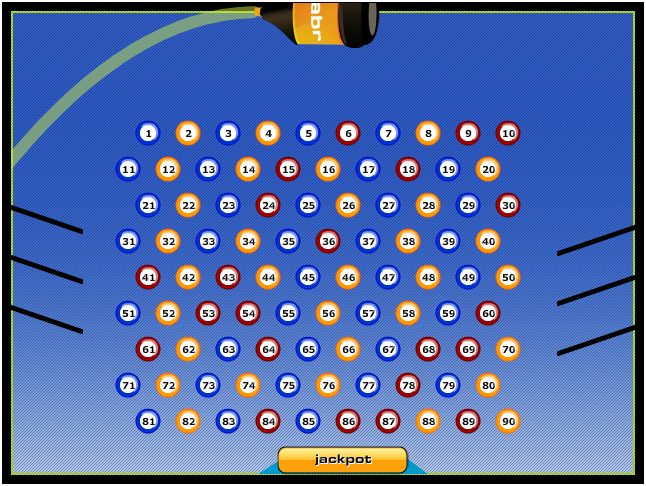
Bingo is dead. Long live Binko!


Many people might think the game is just another Peggle's clone, however, I was actually inspired by Players Plinko, one of the first mini-games I worked on in Gamesys but I won't deny there's an obvious Peggle influence as well.


That was just over 2 years ago, so yeah, the game engine is a bit old already. 

Revamp.
Last year while having a chat with one of my current work-mates (Zuzanna Kucharska) I mentioned the game and talked to her about FlashGameLicense.
She started working on the graphics, I updated the code and a few months later we had Binkos ready to be sold.

 
Despite the fact she did a great job, the game couldn't get any bid higher than $500 with some bids as ridiculously low as $80.
This is an early stages video of Binko's game-play:

First there was only one background and the player would have 25 balls to start with. Later on we added particle effects, different backgrounds for the 5 different levels (from late night to early morning) and the number of balls changed to 7 per level, carrying over any balls not used in previous levels.
After about 6 months we tried the Quick Auction option with the same results. Pathetic low bids.
We couldn't sell the game, so, I decided to release it as a Games-Garden game.

Release.
The first site I uploaded the game to is obviously Games-Garden.
Now the game has been released in:
- Newgrounds.
- Kongregate.
- Mindjolt.
Some other websites have taken the file from Newgrounds already so the viral distribution has already started.
I'll be releasing a Mochiads version of the game soon and see how it goes.

Tech-talk.
Some of the 3rd party libraries I used in Binkos are Box2D library for the physics in the game. Tweener, as usual, for all other animations like the boat going from side to side, points update, etcetera. Flint Particles library for the particle effects when the ball hits the tokens. Playtomic for the game analytics. Leaderboards are from MochiMedia and of course I'm using CPMStar and MochiAds for in-game advertising.

Now, if you're curious about the game and haven't played it yet, go and play Binkos at Games-Garden.

Wednesday, November 09, 2011

Sound spectrum visualizer

I know I'm a bit late for playing with the AS3 sound API but I never had the chance to check it out before until some time this year and specially in recent days as I got the flu and haven't had much to do when at home (my girlfriend doesn't want to catch it so she's sleeping in another room and I'm not allowed out of this room...).
Anyway, after playing a bit with the SoundMixer class, and adding basics Flint particles in the background (yeah, some default example), I ended up with a small flash visualizer and uploaded to YouTube.
 

I think it looks cool, plus I love the song, Deckers Theme by Dom & Roland.
The base of the code can be found at this old post from Mike Chambers. I advise you to play a bit with the code, you can get some really nice results. And by the way, it's never too late to learn new stuff ;)

Monday, November 07, 2011

New Game: Emotiblocks

Just had a quick look at my forgotten blog (yes, the one you're on now) and noticed it's been a while since I mentioned any of my works.

Well, I've been busy doing games and other experiments mixing many technologies as usual.
Anyway, I want to introduce you to my latest released game: Emotiblocks.

It's a match 3 type of game with power-ups and 1 minute levels.
If you don't feel like playing it now, maybe this video from early development stages will tease you enough to try it for yourself:


And if in case you feel like adding it to your site, just download the .zip file from Games Garden 'Games for your site'.

Saturday, May 10, 2008

Flash Games Contest: 5th place

Gaia - Guess Who?
To be honest I was a bit too positive about this one and I was expecting to get one of the first 3 prizes, however, there were 200+ games and many of them were really good, so 5th place is not bad at all ;)

The contest: MochiAds & Gaia Online - Become a Rock Star.

Actually there were two categories:
- Rock Star Winners
- Gaia Audience Prizes

and my game Gaia - Guess Who? won the 5th place of the Gaia Audience Prizes category.

I must say my game Gaia - Guess Who? is not the best but I was positive because I actually participated with 3 games altogether:
- Gaia - Guess Who?
- Save the Ants
- Pawel & the Teutonic Castle
Anyway, I'm really happy I've won a prize on this contest :)

For more info check out the "Become a Rock Star" Flash Game Contest winners' page.

salut!

Wednesday, March 19, 2008

Best Practices? well... ok...

On my previous post I said I would avoid using "best practices" when developing my own stuff; trust me that this thing of people stealing code really annoys me but I've decided to change my tactic.

The thing is, you never know when you are going to work again on a project as for example, I want to update the Flash Date Calendar Widget I built long time ago, and even though the file "is not that bad" still is a bit messy and makes my work a bit harder; now imagine, if I completely avoid doing the things in "the right" way, any update in the future will be a nightmare!

To avoid feeling bad about the "code thieves", what I will do is to keep on writing tutorials and to show how easy is to use my secret weapon: TWEENER.
These days I'll put together a series of tutorials on how I use tweener to do certain tasks like updating score, shooting, updating life, etcetera.

Salut!

Monday, March 17, 2008

Best Practices? no thanks...


Generally speaking, best practices are good. But what are best practices? from the Wikipedia:

...Best practices can also be defined as the most efficient (least amount of effort) and effective (best results) way of accomplishing a task, based on repeatable procedures that have proven themselves over time for large numbers of people.


Right, so in theory we want to accomplish a task in the most efficient way and I absolutely agree with that not only applied on programming but in other things we do in life. Now, if we are talking about programming and more specifically, programming ActionScript for Games, then the thing changes a bit and mostly will depend on one factor: are you developing as part of a team?
if the answer is no, and you are definitely the only one working on certain game (or any application in general), then my advice is: "AVOID BEST PRACTICES".

and no, I'm not mad (well, not that much...) but I've opted for not using best practices because:

- The number of flash developers is growing (this is great!)
- The number of people learning actionscript is growing (is fantastic!)

ok, both are actually good things, but...

- the more people learning actionscript, the more people use the ever growing number of evil tools to decompile your applications.

And that's the thing, I've been working long hours on a specific script, using my knowledge, my brain, studying, experimenting, testing, debugging... and all that just for a bandit that will come and steal all the hard work to monetize with it?
NO THANKS!

the problem is, these days is very easy to monetize with your games, both using MochiAds and getting sponsors so there's a whole lot of thieves out there waiting for you to release a game just to steal some pieces of your code (if not all of it...)

Anyway, at the end of the day, they will manage to do it but I want to make their work not that easy, so from now on, I'll start using something like alphanumeric properties and methods so a code thieve will find only
var s48758wikk49 : String = "alajsktha"
that in fact it should be something like
var score : Number = 567;
and forget about best practices... :D
will be fun!

and of course, I'm seriously thinking about buying SWF Encript from Amayeta, I think any serious flash developer should have a copy of it.

ADVICE: Protect your code!

Salut!

Wednesday, March 12, 2008

Overload Studios website update


First of all, I still haven't got internet at home. Why? well, whenever my girlfriend allows me to turn on the computer, I don't want to spend my time checking my email, forums, blogs, etcetera; I prefer to work! :)
These days I've been working on my games, updating old games and creating new ones and to promote them, I have updated my old website Overload Studios.
Last time I updated the site was back in 2003! almost 5 years ago, so definitely I had to do something about it and do it fast so that's what I did:

Homepage:
- Took a component from AFComponents.
- Followed a tutorial in Spanish from Infected-FX (Gracias wey!)
- Added some of my widgets
- Added google ads, analytics, etc.
and voila!

Games Pages:
- Games and other swf files embedded using swfobject
- Added some of my widgets
- Added google ads, analytics, etc.
and bingo!

my site has many more visits now; definitely a clean, clear and fresh design helps you to get more visits :)
Of course I would love to have something more complex, having a rating system, allowing users to leave comments (that I can use as feedback to improve my games...) etcetera but at least the first step is done ;)

salut!

Monday, January 07, 2008

Hallpass games deal


If you want to monetize from a game you have developed, apart from adding MochiAds and submitting your game to MindJolt as I did with La Cucaracha, you can look for a sponsorship.
There are many games portals out there that, if your game is good, would be happy to pay you some money if you change/add this or that to your game, however, the best deal I have found so far is the Hallpass Developer Top Score Special.
The idea is to make your game compatible with their top-score system and you do that adding just one line of code.
I added this line of code to my game Slippery Pong and submitted it to Hallpass, when my game was accepted and added to the portal, I've got an email from Hallpass letting me know the $50 had been paid to my paypal account :)

Bill, from Hallpass says:

...I have been a full time web master (for games portals) for almost 10 years now.
The reason why I have been able to stick around this long is because I "work with" developers. Not simply sponsor games which I think will get the most hits back to hallpass. As you can see many of our games get passed up by other portals, on hallpass I try and work with up-and-coming developers in the hopes they remember us after they make their first big hit and allow us to work with them on it. I dont get the max value of every game I sponsor but when you add up all the developers together hallpass offers a great package, and helps promote unknown talent.


Hallpass allows your game to have MochiAds so you get money from both your adds and from their sponsorship. I think is a great deal!

Now go and check out Hallpass and don't forget to vote for Slippery Pong ;)

salut!

Friday, December 28, 2007

La Cucaracha in MindJolt

The idea of having a widget to do marketing for a game didn't work much; after joining MochiAds to get some revenue from my games, the thing was going a bit slow...
I still haven't lost my hopes on using widgets to do some marketing though but definitely the way to go is to distribute your applications EVERYWHERE.
For the last year I've been building widgets and uploading them into different distributors, trying not to upload the same widget to more than one distributor; however I don't think it was the best option.
The more distributors show your widget, the more users...
Now, going back to the game "La Cucaracha", I decided to send it to some game distributors, including NewGrounds, where the game did so so and I had some views that generated some small profit (around $1 :D )...
A couple of days ago, I got and email from MindJolt telling me that they had accepted my game and after a small amend should go live; I did the changes and the game went live yesterday and...
HURRAY!!!!
I had almost 50K views in one day only!
the reason?
MindJolt has a really cool Facebook application where people are encouraged to play games and compete with their friends to see who has the highest score...

GREAT!
that encourages me to keep on developing games, although I shouldn't leave widgets on a side, so the next one will be a game widget! :D


Thanks MindJolt!
and of course, thanks MochiAds!

salut!

Sunday, September 30, 2007

Widgets: Web vs Desktop

The way I'm learning things, specially about building widgets, is from trial and error. This is not the best way to learn as it's better to prevent than to cure but as I don't have enough time to read and study about the subject and because this is just a hobby for me, I just do the things as I think they will work but after finding the "errors" I realize there are many things that can be done in a better way.

It's not that I'm new on the subject (building widgets) but it's my nature, I love experimenting, I love finding out how to do things in a different way and I love using my creativity when doing stuff.

So, the series I wrote about "Building flash web widgets" are WRONG!
not because the script doesn't work nor because other technical issues but because of some basic aspects I didn't take into account when I built the widgets.

This is a review of those posts about building widgets and the final product:


Web Widgets vs Desktop Widgets

- Subject
It might sound obvious but web and desktop are two very different worlds and even though there are many people out there trying to merge both worlds, bringing the web to the desktop and vice versa, web and desktop are still very different from each other, desktop is personal, web is open to the world.
Desktop widgets interact more with your system and with the data that comes from it, being this a CPU usage, space left in the hard drive, etcetera, things no-one else cares about but only you.
Web widgets interact more with web users showing visitors statistics, countdowns for different events, music you like, and other things you definitely want to share with other people.
How about building a clock as I did for the tutorials on building widgets?
It works for both web and desktop, it's a common subject but the concept should be treated in a different way: keep it simple for the web and for the desktop, it can be simple or it can be interesting & complex as well.

- Usability
When we are on-line we want the information to be displayed now, we want to understand what it's going on ASAP, therefore, showing an experimental clock where the user has to think to understand what the time is just DOESN'T WORK.

How do I know that?
Well, just check out the pathetic statistics; after more than a month out there, the clock has not even 30 subscriptions.
On the other hand, we are used to admire the desktop and its applications, we can open any widget and take our time to check it out, we love playing with it, dragging it, changing colours checking the different options, and if we don't like it just drag it to the recycle bin and that's it...
More than 500 downloads in less than a month tells me that.

- Dimensions

Even though your web widget can be displayed in many different environments, most of them and in most of the cases, they will be displayed in the sidebar of a blog; remember that nowadays not only my aunt but hers cat has a blog and even if it's not the rule, your widget will end up in a sidebar's blog.
As mentioned in this post, the "Pie Clock" is 200 by 200 pixels and that is TOO BIG for any sidebar.
I would recommend any size from 100 to 180 pixels width and depending on the concept/design, from 50 to 300 pixels height. I would say, 180x300 pixels is just the perfect size, however, this depends on the subject-concept-design.
Take into account that Google adds some extra pixels to the sides of your widget (b*stards! :D ) as you can see on this breakout-mini widget that just looks AWFUL.

- Size

Not the dimensions but the size of the application itself, known as well as weight, in bytes.
Might seem to be obvious but as we are used to develop things for the web, we tend to optimize all the graphics for the web.
In fact, when building web widgets, we SHOULD optimize for the web all the graphics and our widget should not be bigger than 50kb (that is already BIG!), however, that again depends on the concept. Remember that people will have more than one widget and we should think about the loading time of a website and how important it is for users (when a site takes to long to load, people tend to close it and visit the next one...)
When building for the desktop, the graphics should look really good, we don't need to optimize them and we can add all the necessary stuff using the best possible quality as users don't care about how big a downloadable file is; of course, we don't have to abuse, I would say from 2 to 3MB file size would be fine.

- Shape

I know I want to be as creative as possible, I want to break the usual square and my widget should have crazy shapes everywhere.
Well, if we are using Google Gadgets to distribute our web widgets, that won't be the case, Google adds an ugly box around the widget with an opaque background so our web widgets will look like in a prison that doesn't let them "breathe" (graphically speaking). Did I called them b*stards before? :D
For desktop widgets its different, we can have nice shapes, of course, we shouldn't abuse nor we should have transparent octopus shapes everywhere, keep it simple but break the square box.

- Final touches
Adding nice animations and transitions is essential for an eye catching widget, of course being careful not to reach the limit from nice to cheesy.
The advantage for web widgets is that the whole widget can have an animation, it can move from side to side, change shape, etcetera, but desktop widgets, specially with exotic shapes, request a lot from the processor when moving on the stage.
Another thing to add is an extra menu using the right button of the mouse, read this post for web widgets and this post for desktop widgets.
Something I'm considering is adding a "read me" .txt file attached to the desktop widgets where I can explain how to use the widget and other documentation.

- Distribution
I have explained before about the differences, check out this post for distribution of web widgets and this other for distribution of desktop widgets.

- Extra options
When adding customization options to the web widgets, the options are usually available only when first selecting and installing the widget. Could be great if the web widgets would have a better way to update this customization options when already installed. I'm not quite sure but Clearspring allows you to update this options when the widget is already in use, I remember having read something about it when adding one of their widgets on my blog.
Desktop widgets usually have the option to change settings at any time, that's a great thing and a big advantage from desktop widgets over web widgets.

I advise you to read the following posts as they both can apply for web & desktop widgets as well:
- Elements of a wining widget
- 10 things to consider when building widgets.

If you think of any more things we should take into account when building web and/or desktop widgets, please add them in the comments.

Salut!

Sunday, September 09, 2007

Widgets infrastructure, where is it?

... never-ending loading ...

So far, no one has yet set the rules in this crazy widgets world and now we are suffering the consequences. Different distributors use different options, tools, scripts, approaches, etcetera and none of them seem to be compatible with each other.

Even though from November last year the World Wide Web Consortium already listed a document about widgets, there's still something wrong about the web widgets ecosystem.

Alex Iskold has a very interesting post on the subject (How javascript is slowing down the internet...) and after reading it, I got rid of some widgets as an attempt to speed up the loading time of this blog but it is still slow.

Today I was reading a post from Derek Anderson and his frustration on the matter (Fricken widgets keep disappearing) and I absolutely agree on what he says. Lawrence Coburn at Sexy widget wrote something related and how he realized it after one of his readers comment.

Definitely we need to do something about it.
Now, that us (widget developers) need to monetize to have decent servers, it's definitely true!
My stuff is hosted in a very dodgy server and I've asked for help to some widget distributors without any positive answer. At the end of the day, I don't get anything from my widgets but they do and they should help us out.

There are some distributors that host the widgets themselves and that's fine as I don't need to worry about my dodgy server, however, sometimes their server is slow as hell so I have got rid of 5 cool widgets hosted in their server as you never know when their server will go slow again (affecting my site).

Now let's see how the process works:
- As an internet user I visit your page and this one starts loading. The speed depends on my machine, my internet connection and YOUR SERVER (where your site is hosted).
- If you have widgets, the first request goes to THE WIDGET DISTRIBUTOR'S SERVER
- as soon as the distributors javascript file has loaded, this pulls the widget and it comes the third request: WIDGET DEVELOPER'S SERVER.
- how about if the widget triggers some info from a web service? and if it's a mash-up? more servers involved...
- It's very likely you will have more than one widget (specially if you blog about widgets) and the more widgets distributors involved, the more requests to different servers, the longer your page will take to load...
kaput!

There are far too many steps, requests, etcetera and what happens is, your page is taking ages to load and I don't want to wait so I leave your site...

Solution: get rid of all other widgets but mine! :D ok ok, that's not a solution...
I think the problem is very complex, distributors and developers need to find a solution together, the developers need more support from the distributors, otherwise this crazy widgets world will collapse soon.

salut!

Tuesday, August 21, 2007

OT: Goodbye "sponsors"

I remember when I started "blogging" I decided not to add any sort of adds as I thought they looked bad, they wouldn't add any good to my blog and anyway I didn't have many visits... nowadays I've got some more visits (more than a couple of thousands monthly) and even though I still think adds look bad, after reading so many stories about people who make money from them I decided to give them a try so I could pay a proper server to host all my experiments and make more interesting stuff mixing more technologies (PHP - MySQL - Flash) because at the moment I've got a very basic account without access to a database and millions of .txt files for some of my widgets users to store specific data (ie counters).

For about two months or so I tried an affiliate program and added some banners to the blog expecting some of my readers will click on them and buy some stuff...
It happened that they clicked on the banners a couple of times but never bought anything, I guess it was because they where about UK based companies and most of my visitors are from other places.

Today I've decided to say goodbye to these "sponsors" as I didn't get any penny from them :D and I'm only leaving the old and worse looking Google adSense.

With that one is another story, I added it a couple of months ago and still don't understand why it shows some funny adds, not related at all with what I write about...
I remember about a couple of weeks ago when I was about to say goodbye to them as well, someone clicked on one of the links and I got my first $0.15, then I decided to leave them, I don't know how long for as so far I have earned less than $0.50! :D

Well, anyway, affiliate programs are not for me, the banners where really annoying so I'm happy I got rid of them :)

salut!

Sunday, August 19, 2007

Google Gadgets API: what a pain!

So far I have uploaded widgets to three different sites:
- Widgetbox
- Widgipedia
- Yourminis
and I must say that the first time I uploaded a widget to any of these three sites it was not an easy task but not something out of this world, these three distributors are doing their best to help any developer to publish their widgets with ease, some of them have more steps, other ask for more information, but the requirements are not really a big deal.
However, Google Gadgets is different cup of tea. After reading many different pages from its documentation I still haven't managed to find out how to allow users to change settings to a flash widget; the documentation is just too big and complicated, many pages with many links that don't give precise answers or at least I couldn't find them...
I gave up trying to upload the clock from my previous post as it has some options to change the colours so I had to upload another experiment just as a test; after following their instructions and building a not too friendly xml file, I managed to upload a widget:


I still couldn't see if its in their library as whenever I look for its address I only get this error:

Sorry, http://hosting.gmodules.com/ig/gadgets/file/113526947643047156725/analoguecalendar.xml is unavailable. Please try another result.


well, maybe another day I will continue reading the dozens of documentation pages and I will manage to upload other widgets...

now, its time to go :)

salut!

Friday, August 17, 2007

And the widget winner is...

(title stolen from Daniel Todd's blog)

I mentioned before, I had built a widget for my new addiction and actually submitted it to a competition at:

Clicky Web Analytics

guess what?
I WON THE FIRST PRIZE!

It was announced today at the Clicky blog; now I will tell you my secret on this one:
The concept and graphics were made by José Peña Pocasangre, a great Art Director based in Barcelona, Spain.
I told my friend "Penapoca" about the competition and immediately he started thinking about a concept, couple of days later he sent me the cool graphics and I just put them in flash, pulled the data from Clicky, added some animations and voila! a nice and customizable widget was in the way to the competition... the rest is history...

hey!
Thanks Clicky for the support! :D

Hopefully soon the widget will be available for distribution and definitely I will add it here to show you some of this website's statistics.

salut!

Wednesday, August 15, 2007

Mashup of the day: Moving Earth

Today I've got an email from the guys at MashupAwards telling me some really good news: the Moving Earth widget I built for the Big Widget Challenge (and won the contest) was nominated and selected as award winner for Mashup of the day at their website.

Mashup of the day

Thanks for the award! :)
And by the way, if you need inspiration or just want to see some cool stuff, go to the MashupAwards and check out the daily & monthly winners.

salut!

Monday, August 13, 2007

a widget for my new addiction

I do accept it, I've got a new addiction:
Clicky Web Analytics

There are many tools out there to check out your website's statistics and most of them offer you the same options, however, Clicky has something that really makes checking statistics an addiction: the Clicky spy.
Of course my website doesn't have the traffic Clicky does but still I can check in real time who's visiting me and what my visitors are doing...
It's really cool to see how my visitors jump from page to page internally and click on external links, etc.

Another cool thing is that Clicky has its own API so developers can play with it an create widgets or similar stuff and these days they are running a contest for widgets developers; of course I've submitted a widget that I hope I will be using here as soon as the guys at Clicky allow me (I guess until they decide the contest winners, the submitted widgets should remain "hidden").

We will see how it goes :)

Click here to check a table with the differences between Clicky and "the other guys"

salut!

Thursday, August 09, 2007

Don't do it!

If you are a StumbleUpon fan and are looking for a StumbleUpon button, DON'T google "submit to stumbleupon", it's a bad idea!

via Adam Kalsey.

salut!

Saturday, July 28, 2007

Flash Spanish-Polish application - update

A year ago I posted something about a Spanish-Polish application I was working on as part of the experiments and personal stuff I was doing in my spare time.
Let's see an update on what I mentioned in that post:
- I managed to finish just 2 out of the 3 games I was working on (Breakout & Blitzkrieg)
- The Spanish-Polish application is still half way, those designs where put into flash but still there's a lot to do.
Only 3 out of 8 sections are working: Time, Calendar & Colours but still need sound.
Click here if you want to check it out.

And, what am I working on these days?
- 3 widgets
- if I have time, I might continue with the Spanish-Polish application...

Salut!
Spanish-Polish application

Tuesday, July 17, 2007

my 15 minutes of fame

Andy Warhol said once:

"In the future, everyone will be world-famous for 15 minutes."

I think it was my turn as when my latest widget was announced winner of the Big Widget Challenge, the news were posted on MASHABLE, one of the most important news websites about social networking & web 2.0.
I did a quick search on Google and found the widget being mentioned on another couple of sites:
BOL - Business On-Line (Japanese), STUFFLEUFAGUS & Colechurch Consulting.

--- UPDATE ---
just wanted to add two more links:

Daniel Todd who's blog is part of the MXNA and
StickyWidgets (bookmarked) that I found just minutes after publishing this post
----------------

Big thanks to all of you!

To celebrate it, I've changed the look & feel of this blog. To be honest, it wasn't easy because Blogger is not as flexible as other blog platforms but hey! I like it! :)

I just hope I can manage to have some free time to experiment more with Flash, build more widgets, games & write some more tutorials...

salut!

Saturday, July 14, 2007

Big Widget Challenge winner

Having built some widgets for Widgetbox, three weeks ago I've got an email from them inviting me to participate in the BIG Widget Challenge which was a contest organized by Freewebs and Widgetbox.
So, I did this Flash widget that takes information from the United States Geological Survey's Earthquake Hazards Program; this info is partly presented using Google Maps thanks to a component developed by AFComponents, and the rest of the info is presented in an info box which has a couple of animations made with the tweener class.

The contest winner has been officially announced at the WidgetCon 2007 website, so, I'm proud to say that I won the contest!.

If you want to have a look at the widget click here.


Salut!