Showing posts with label Widgipedia. Show all posts

Sunday, December 11, 2011

Widget: iClock

More than 3 years ago I decided to move from developing small applications and left the 'widgetsphere' to focus more in the casual games industry. I created Games-Garden, a facebook app and a bunch of games.
These days my mode has changed a bit and I don't feel like spending all of my spare time creating games which might be played only a few thousand times. The competition is too big and there are lots of 'pirates' stealing games (specially from China) which is not fun at all.
So, I've decided to go back to create these small apps known as widgets. The first one I'm releasing is this iClock. Similar to the Digital Time and Date widget that I created more than 5 years ago, which by the way it has been cloned many times already, the iClock shows the time in a 12 hours format and as well it shows the date when moving your mouse over the small calendar icon which shows the day. The graphics obviously have a big influence from the iDevices and so far it looks like people like it. What do you think?


Personally I think is nice :)
I had the idea of creating a similar widget many years ago when at my previous job I worked on a countdown and these days the idea came back after my current task at work includes a copy of that old countdown. So yeah, it looks like everything is a remix... :D

Wednesday, February 06, 2008

Widget: Piranha Loca

As I mentioned before, I had the idea of working on a game-widget or a widget-game or whatever you want to call it...
And there it is, a widget called Piranha Loca, available at this moment only from Widgipedia as a web widget but I'm planning to add it to different widget distributors and have it available as a desktop widget as well.
Again I've added MochiAds to the game so I can get some revenue out of the long hours that took me creating it :)


Salut!

Tuesday, January 29, 2008

Widget: The Persistence of a Genius

Inspired by Salvador Dalí's "The Persistence of Memory" where melting clocks mix with other elements including a group of ants, there it is yet another analogue clock for my collection...


The time is first taken from the computer system then shown as an analogue clock; the ants react to the mouse pointer.
I've taken some elements from different widgets I built before as some of the elements used by Dalí were used in more than one of his masterpieces...
When I was developing it, I was listening to "Salvador Dalí" by the Spanish band Mecano about 3 or 4 times in a row... I love that song! :)

If you like the Persistence of a Genius, you can get it from this link.

Salut!

Monday, January 14, 2008

widget: add to favorites flash button

Checking the statistics for Slippery Breakout's new page, I found interesting that some people come directly to the it so I guess they have added the game to their favourites.
I decided that would be good to give the users an option to add it to their favourite websites with a flash button as I've done before and continue my collection of flash button widgets. So far we've got:
- add to delicious
- add to stumble upon
- add to google
- add to netvibes
- add to technorati
- add to bloglines
and the latest one:
- add to favorites!

come on, don't be shy and give it a try:


the cool thing is that it works with both Mozilla Firefox and IExplorer (I shouldn't mention IE but you know... it's still in use... :D )

Let's see how it does and if it manages to get to the Widgipedia top widgets as its "brothers" did ;)

salut!

Saturday, September 08, 2007

Building desktop widgets: distribution

I have already written something about the distribution of web widgets but if we are talking about distributing desktop widgets, the approach should be a bit different.

If you have built a Mac Dashboard widget, definitely you would need to submit it to Apple Dashboard, however, you shouldn't leave the things there and should submit it to a different distributor as well, in this case I would recommend you Widgipedia.
In fact, Widgipedia is the only distributor that accepts any sort of widgets, from web widgets to Mobile widgets and of course desktop widgets so if you have followed my tutorials on Building desktop widgets with Zinc and right click on desktop widgets, the following step is the distribution.

Something I like the most about submitting widgets at Widgipedia is that your widgets don't need to be accepted and approved by any person so as soon as you have finished filling in the form and click "submit" your widget will be available for distribution. Great!
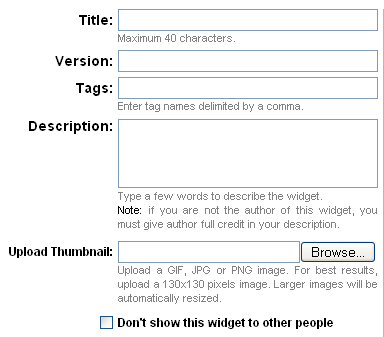
and to make the things even easier, the form to submit a widget to Widgipedia is unbelievable simple.

The steps to follow are:
- Sign up if not already a user

- click on the Submit a Widget button


- Fill in the form


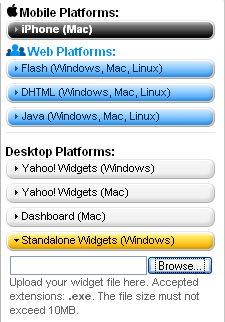
- Choose the platform and browse for your widget (in this case is a standalone widget for windows)


- Click submit and you should see the message "Your widget was successfully updated." and that's it, your widget should be the first one in the gallery and the distribution will start...

Check out the "pie clock" desktop edition that I just uploaded.

So now you know, for desktop widget distribution, Widgipedia is the way to go.

salut!

Sunday, September 02, 2007

Building desktop widgets with Zinc: Right click

{MDM} Script

I've written another tutorial about Building desktop widgets; I had explained before why I'm using MDM Zinc and what I've done with it so far.

On this new tutorial you will see a bit of the {mdm}Script and a bit more of actionscript as I mention another feature of the ContextMenu class that used before in my post Building flash web widgets: Right click.

I must say there's lots of potential in Zinc, just have a quick look at its documentation and you will know what I mean, specially the {mdm}Script 2.0 API; there are many options from database connectivity to socket communication but the best of it is the support forum where people like Peter Blazejewicz are happy to help you out. I mentioned Peter because his willing to help is just impressive!

If you followed my previous tutorial, go and check this one out as after it you will have a desktop widget ready to distribute.

salut!

Tuesday, August 28, 2007

Widget: Subscribe to my feed

I have just uploaded a widget to Widgipedia called "Subscrbe to my feed", erm... I know, the name is not that nice but I'm not that creative to put names to my widgets :P
This is the description from Widgipedia:

Replace that old RSS button for this cool Flash button to promote your feed and allow your viewers to subscribe to your site with ease. Just put this widget into your blog (or any other page with a feed) and flash will do the rest.


Technically speaking, via javascript-actionscript it gets the URL where is embedded into and sends it to a php, this php searches through the html of the page and returns the RSS (if any), then is easier for the user to add your feed to any reader.

The original design was made by UtomBox and you can find it here, and this is the way it looks:


Click on the "get" button to grab it and embed it into your blog and of course, click on the widget itself to add my feed to your reader ;)

salut!

Monday, August 27, 2007

Building flash desktop widgets with Zinc

MDM Zinc

I just posted a thread in the Widgipedia Workshop forum about "building flash desktop widgets with Zinc".
Hopefully this week I will have time to continue writing about it, I know many people are interested in building desktop widgets and I'm happy to share my experience.

As I mentioned before, I was very lucky to win a copy of MDM Zinc in last year's Flash on the Beach, since then I've been using it to create desktop widgets and screensavers, among them:
- To-do sticky note
- CPU-usage (pentium IV only)
- Firefox-Calendar
& a cool Firefox Screensaver.

If you are interested in building desktop widgets and are familiar with flash, then follow this link.

salut!

Tuesday, August 07, 2007

Building flash web widgets - Part III

This is the third part of the series "Building flash web widgets". If you haven't read the previous posts, please check the following links:
- Building flash web widgets - Part I
- Building flash web widgets - Part II

ok, let's continue.
So far if you test your movie, you should see something like:


is static and is boring, so let's add some more code:


function attachSecond():Void {
seconds++;
seconds_mc._width = seconds*3+6;
seconds_mc._height = seconds*3+6;
}

timer = setInterval(attachSecond, 1000);


with this code we are telling flash to change seconds_mc width and height to a bigger number every 1000 milliseconds (1 second), and if we test the movie, in fact seconds_mc grows every second. The problem is that it doesn't stop growing, so let's add some more code:


function attachSecond():Void {
seconds++;
seconds_mc._width = seconds*3+6;
seconds_mc._height = seconds*3+6;
checkSeconds();
}

function removeSeconds():Void {
seconds_mc._width = 6;
seconds_mc._height = 6;
}

function checkSeconds():Void {
if(seconds>59){
seconds = 0;
removeSeconds();
}
}

timer = setInterval(attachSecond, 1000);


In our function "attachSecond" we are calling "checkSeconds" to see whether the cycle has been completed and we have already 60 seconds, if so, we call removeSeconds to resize seconds_mc to 6 pixels that we decided to have (in the previous tutorial) instead of a 0 (zero) to see something on the stage. Then we should attach another minute:


function attachSecond():Void {
seconds++;
seconds_mc._width = seconds*3+6;
seconds_mc._height = seconds*3+6;
checkSeconds();
}

function removeSeconds():Void {
seconds_mc._width = 6;
seconds_mc._height = 6;
}

function checkSeconds():Void {
if(seconds>59){
seconds = 0;
removeSeconds();
attachMinute();
}
}

function attachMinute():Void {
minutes++;
minutes_mc._width = minutes*3+6;
minutes_mc._height = minutes*3+6;
}

timer = setInterval(attachSecond, 1000);


How about if it was minute number 60? so we would need to check if it is, reset the value back to zero and attach one more hour...


function attachMinute():Void {
minutes++;
minutes_mc._width = minutes*3+6;
minutes_mc._height = minutes*3+6;
checkMinutes();
}

function checkMinutes():Void {
if(minutes>59){
minutes = 0;
removeMinutes();
attachHour();
}
}

function removeMinutes():Void {
minutes_mc._width = 6;
minutes_mc._height = 6;
}

function attachHour():Void {
hour++;
hours_mc._width = hour*15+6;
hours_mc._height = hour*15+6;
}

timer = setInterval(attachSecond, 1000);


and, how about if it's hour 13? or even worse, hour 25?
then, we need to check the hours and set it as it should be:


function attachHour():Void {
hour++;
checkHours();
hours_mc._width = hour*15+6;
hours_mc._height = hour*15+6;
}

function checkHours():Void {
if(hour>11){
hour = (realHours<12)?12:removeHours();
}
}

function removeHours():Number {
hours_mc._width = 6;
hours_mc._height = 6;
hour = 1; return hour;
}

timer = setInterval(attachSecond, 1000);


if we test our movie, it should work fine and the clock should be ok, adding minutes and/or hours when adequate.
The whole code looks as follows:


var timer:Number;
var timedate:Date = new Date();
var realHours = timedate.getHours();
var hour:Number = (realHours<=12) ? realHours : realHours-12;
var minutes:Number = timedate.getMinutes();
var seconds:Number = timedate.getSeconds();
delete timedate;

trace(hour+":"+minutes+":"+seconds);

seconds_mc._width = seconds*3+6;
seconds_mc._height = seconds*3+6;
minutes_mc._width = minutes*3+6;
minutes_mc._height = minutes*3+6;
hours_mc._width = hour*15+6;
hours_mc._height = hour*15+6;

function attachSecond():Void {
seconds++;
seconds_mc._width = seconds*3+6;
seconds_mc._height = seconds*3+6;
checkSeconds();
}

function removeSeconds():Void {
seconds_mc._width = 6;
seconds_mc._height = 6;
}

function checkSeconds():Void {
if(seconds>59){
seconds = 0;
removeSeconds();
attachMinute();
}
}

function attachMinute():Void {
minutes++;
minutes_mc._width = minutes*3+6;
minutes_mc._height = minutes*3+6;
checkMinutes();
}

function checkMinutes():Void {
if(minutes>59){
minutes = 0;
removeMinutes();
attachHour();
}
}

function removeMinutes():Void {
minutes_mc._width = 6;
minutes_mc._height = 6;
}

function attachHour():Void {
hour++;
checkHours();
hours_mc._width = hour*15+6;
hours_mc._height = hour*15+6;
}

function checkHours():Void {
if(hour>11){
hour = (realHours<12)?12:removeHours();
}
}

function removeHours():Number {
hours_mc._width = 6;
hours_mc._height = 6;
hour = 1;
return hour;
}

timer = setInterval(attachSecond, 1000);

As a good practice, we have declared the variable timer at the beginning so flash knows that the variable exists and which sort of variable is.
Then is up to you to add more stuff, for example tweenings, changing design, etc. and don't forget to add something to help "reading" the clock, for example the cross I drew in mine showing numbers from 1 to 12 and from 10 to 60 so the users will have an idea about the time...
and basically that's it! you have a clock working 100% and you can now upload it to any widget distributor like widgipedia, widgetbox or yourminis.
One of these days I will post a clock I'm working on using the same code but different design to give you an idea of what you can actually do.

Any question or comment is very welcomed ;)

salut!

Wednesday, August 01, 2007

Building flash web widgets - Part I

I have already written something about building small flash applications that later on I made them widgets:
- Flash add to del.icio.us & the widget in widgipedia. I used a similar script for the rest of the buttons I uploaded to widgipedia.

- Skype status in flash, used to build the widgets Flash Skype Status & Skype analogue clock uploaded to widgetbox.

- Flash-php file downloads counter, that easily can be made a widget.

So, the idea of this "series" of tutorials is to build a flash widget and upload it into a widget platform for the world to see, use, rate & you become famous as I did... :D (I'm joking, ok?)

I will not ask you to build the basic "hello world" as I would prefer to go much further than that, even though we will build a basic widget: a clock; but we will use the time units in a more creative way and we will build something like:


I assume you have Macromedia Flash 8 (or Adobe Flash CS3) installed and you are familiar with it.

Let's start:

- Create a new flash document and change its properties going to modify>document or pressing control+j (apple+j if in Mac), the new dimensions should be 200 width & 200 height, however, its better if your widget is even smaller; change its frame rate to 24fps and click ok.

- Our stage is empty and we have only one frame; rename that frame "actionscript" and lock it as we don't want anything else on that layer, just our actionscript (best practices, you see)


- Select the first frame (the only one we will use, best practices...) and add the following code:

var timedate:Date = new Date();
var realHours = timedate.getHours();
var minutes:Number = timedate.getMinutes();
var seconds:Number = timedate.getSeconds();

delete timedate;
trace(realHours+":"+minutes+":"+seconds);


Press control+enter to test your movie and you should see something like 22:44:38 in the output window and it is the actual time as taken from your computer's system.
What we are doing is:
- instantiating the date object in a variable called timedate.
- calling three different methods of the date object to get the hours, minutes and seconds and storing the values in three different variables: realHours, minutes & seconds.
- deleting the date object instance as its not needed any more so we clean it from the memory (best practices...)
- with trace we tell the output window to show us what the variables have stored.

ok, we now know how late it is, but, to be honest, I don't like that of "22 hours" as its sounds to military for me and I'm used to see 10pm instead of 22 hrs...
so, let's change the code:


var timedate:Date = new Date();
var realHours = timedate.getHours();
var hour:Number;
if (realHours<=12) {
hour = realHours;
} else {
hour = realHours-12;
}
var minutes:Number = timedate.getMinutes();
var seconds:Number = timedate.getSeconds();

delete timedate;
trace(hour+":"+minutes+":"+seconds);


Similar idea, we have just added a new variable: hour and its value depends on realHours value, using a conditional we are sure not to use the 22hrs format but a more understandable one (and better for this example). Testing our movie, we should have something like 10:45:14.

Actually, the code looks a bit too messy; having a conditional in the middle of the way doesn't look that good, but good job there is a short cut for that conditional, so, we change the code again:


var timedate:Date = new Date();
var realHours = timedate.getHours();
var hour:Number = (realHours<=12) ? realHours : realHours-12;
var minutes:Number = timedate.getMinutes();
var seconds:Number = timedate.getSeconds();

delete timedate;
trace(hour+":"+minutes+":"+seconds);


It's exactly the same, just a different syntax that I find cleaner. If you test your movie, your output window should show you something like 10:50:11.

Well, I'm afraid that's it for today; I've got to do some house work now but we will continue soon. In the meantime, think about your design, read more about the date object and see you later.

salut!

Saturday, July 21, 2007

Add to Google Flash Button

Trying out FeedBurner I noticed most of my feed readers are using either iGoogle or Google Reader, products I knew about but never took a close look at them.
I assume many other people are using this two ways to check news on many blogs without going to each blog each time...
so I built this Add to Google flash button widget and uploaded it to Widgipedia, this is the description:

Promote your feed by placing this widget to your website. This will make it easy for people to quickly add your feed right to their Google homepage or Google Reader.

and this is how it looks like:


The Widgipedia gallery
requires Adobe Flash
Player 7 or higher.

To view it, click here
to get the latest
Adobe Flash Player.
Get this widget from WidgipediaMore Web & Desktop Widgets @ WidgipediaMore Web & Desktop Widgets @ Widgipedia


To be honest it wasn't that easy to build as there is some crazy php coding behind to get the HTML code from the page that displays the widget, search through it looking for the feed address and as soon as it locates the feed, sends this address to Google...

I hope people find it useful and if you think of a similar widget I should built, just shout ;)

salut!

Sunday, June 17, 2007

Nice gallery of my widgets...

Browsing Widgipedia widgets, I found this nice widget that shows all the widgets I have submitted to Widgipedia so far:


Simple and very easy to customize, as a widget developer I find it very useful and now I can show all my widgets in a nice way :)

Thanks Widgipedia!

Saturday, June 16, 2007

Widget: to-do Sticky Note

I just uploaded a widget to the Widgipedia: to-do
to-do is a simple sticky note widget. Stores anything you write (some special characters accepted). Use your mouse scroll wheel to scroll long text.

You can test it online:

It stores the data on your hard drive so whenever you come back to this page using the same computer, you can read what you wrote before...

Download it from Widgipedia (Windows platform only)

salut!

Saturday, February 24, 2007

Submit to StumbleUpon flash button

I've just uploaded a new WebWidget to Widgipedia: "Submit to StumbleUpon flash button"
Integrate your site with Stumbleupon; Adding this widget allows people to submit a story from your blog or any other personal website to Stumbleupon for others to discover.
StumbleUpon is a great way to find websites that are really interesting for you as they have been submitted to the database into different categories, you subscribe only to the categories you like. It's so addictive that my del.icio.us account is growing thanks to the cool stuff I discover when I "Stumble".

If you already have an account with them and have a blog, why not adding this widget:


Tested already by submitting this page to StumbleUpon!
Get it from Widgipedia.

Salut!

Wednesday, January 24, 2007

web widgets on the widgipedia


Some days ago, widgipedia announced the opening of their new section: web widgets.
We have promised that we'd create the ultimate widgets resource, so today we've taken one step closer to this goal by merging the two worlds: desktop widgets AND web widgets are all together at Widgipedia.
as some of my web widgets were not compatible with widgetbox, I gave them a try on widgipedia and luckily for me they all work like a charm!
So far I have uploaded three of them:

- Add to bloglines flash button
- Add to delicious flash button
- Add to netvibes flash button

So, if you are looking for some cool web widgets, you can also visit the widgipedia and if you have any request, comment, suggestion, idea, etc. I'm happy to read it.

salut!

Tuesday, January 16, 2007

Desktop widget: CPU usage


I need feedback on one of my latest desktop widgets.
This standalone desktop widget for windows doesn't require installation. The following description is taking from the widgipedia where the widget is hosted:
Bars and numbers showing the percentage of your CPU Usage. No installation needed. Stays on top of all other windows allowing you to see the resources request from different applications. Press Esc key to close it.
One person has left his feedback saying it doesn't work; so please if you can try it and leave comments about it either here or on its webpage telling me whether it works or not, would be really appreciated.

Thanks!

Saturday, December 30, 2006

My first desktop widget!


Some time ago I asked the guys at the Widgipedia to open a section for web widgets but as the Widgipedia is still in beta, they told me:
Flash widgets are coming soon, as part of our goal to host "the best widgets and gadgets across any platform"
so I continue with my web widgets and put them in Widgetbox.
On the last day at Flash on The Beach I was the lucky winner of a MDM Zinc copy which allows you to create desktop applications from flash including screensavers and WIDGETS!
So I did my very first desktop widget today, after few days trying to understand the tool that for any strange reason doesn't like vector images... and uploaded it to the Widgipedia!

It is a very simple Skype Analogue Clock but I think is cool, specially because is my first desktop widget :)

Salut!