Showing posts with label Firefox. Show all posts

Sunday, February 25, 2007

Flash-PHP file downloads counter

If you want to keep a record and show how many times has a file been downloaded, you can use Flash, php and a simple txt file to hold the number of downloads.

When I finished my Firefox Screensaver, I showed it first at the spreadfirefox community, of course, without any way to count the downloads.
When I finally had the time to show it here on my blog, I was looking for a way to count the number of downloads but had the limitation that on this blog, as far as I know, is only possible to write "front-end" scripts and, as you know, without a server is not possible to have any downloads counter as there is no way to store any data.

However, using flash as front-end I can pull any data from anywhere behind the scenes and show it back on the same flash.

Then, if in case you want to create a file downloads counter, just follow these steps:

First of all, we will need 4 files,
- the file we want to be downloaded, usually a compressed .zip file
- theCounter.txt file which will store the downloads number
- the flash file to show the number of downloads and to allow people to download the file
- a php file which behind the scenes will manage the downloads counter and point to the right link to the file to be downloaded.

Let's start with the flash file:

- Open a new flash document
- Put on the stage all the graphics you need and also a dinamic text field which will show the number of downloads with an instance name of "downloads" as shown in the picture:


- Select the background image and press F8 to make it a movieclip, and put it as instance name "downloads_btn"


- On a different layer called "actions", write the following actionscript:
// --- Function to load the stored number ---
function loadingVars():Void {
var my_lv:LoadVars = new LoadVars();
my_lv.onLoad = function(success:Boolean) {
if (success) {
downloads.text = "( "+my_lv.downloads+" downloads )";
} else {
trace("Error loading/parsing LoadVars.");
}
};
my_lv.load("theCounter.txt?num="+random(999));
}
// --- Calling the function ---
loadingVars();
// --- Button actions ---
downloads_btn.onPress = function() {
getURL("downloads.php");
};
downloads_btn.onRelease = function() {
loadingVars();
};
What is happening here is, first we are loading the variable stored in theCounter.txt file and to avoid the cache memory and load a fresh value everytime, we add a ?num=random(999) that gives us a unique value when calling the same file, that way the browser thinks you are loading a different file...
When pressing the button, we are calling a php which is the one in charge of the download and counter system.
On releasing the button, we load the variable again and as the file we are offering for download has been requested another time, the value of the variable loaded is bigger by one.
Save the file and publish it to have a swf file.

Now let's see the php:

- Open dreamweaver or any other php editor; even notepad can do the job.
- Write the following code:
I'm sorry this is an image but as I said before, blogger doesn't like back-end scripts and stripped it out when I wrote it here...

We are first opening theCounter.txt file, checking what it has inside and from it, the value of "donwloads" is stored in a variable called "count", then add one to this value, write the variable and the new value of it back to the txt file and closes it. Next we give the real location of the zip file and redirect the browser to it.

The .txt file has only one line inside:
downloads=X
where X is the current number of downloads, so the first time it should be 0 (zero).
That's it!
just upload everything to a server with php support and embed your swf where convenient.
For example, I embeded my swf on this post:


Try it, click on the button, download and install the screensaver, if you don't like you can always uninstall it :)

salut!

Sunday, February 11, 2007

Take back the web & the desktop!

Firefox ScreenSaver


To help to spread the SFx community and Mozilla Firefox at the same time, I've done a ScreenSaver that shows the Firefox downloads in a different way.

The idea behind is to reach 1 Billion downloads (now is a bit more of a quarter of billion) and show it as a full Firefox logo.
So far if you leave the screensaver running, it shows just 1/3 of the logo as only 1/3 of a billion has been downloaded as per today (11/Feb/2007) and this third of billion is slowly uncovered by squares (the data collected is transformed into squares, each square represents 200,000 downloads)...

well, better if you check it by yourself :)


salut!

Sunday, January 14, 2007

widgets: yeah, I changed my mind...

more than a month ago, I wrote "My widgets on widgetbox" where I said I wouldn't write about my widgets on this blog anymore.

Well, actually I changed my mind as I have decided to continue writing about them and is because of many reasons:
- Feedback: I can get feedback, comments, suggestions and requests
- QA: To test them and to see how they look like when published on a blog
- Incompatibility: Some of the widgets I've done or updated are not compatible with widgetbox
- Promotion: I want my widgets to be used by other people so I need to let people know about them
- Personal: To use my blog :P (writing is a good habit and specially for me as English is not my mother tongue...)

so, to catch up I will write a short list of the web widgets I've done and I haven't mentioned here:
- Mini del.icio.us hotlist: shows hotlist from the del.icio.us homepage
- Flash Date Calendar: simple flash calendar with digital clock
- Firefox Digital Clock: firefox download counter and digital clock
- Digital Time and Date: simple digital clock and date (74 subscriptions so far)
- Flash web counter: website visits counter (123 subscriptions so far)

So far, I have submited 9 web widgets to widgetbox and all of them are doing well; I have many more ideas but haven't got the time but from now on, I will continue writing about them here on my blog.

Salut!

Monday, January 08, 2007

Hi5?


The other day I had a bit of spare time and while working on my Firefox-Calendar desktop widget, I managed to update my hi5 account.
At last! after many times trying to open the buggy website I could use the old "features" and check the new ones.
One of the things that I liked is that you can use flash now and as a test I put my Flash Skype Status button on it.
I don't know why in Latin America hi5 is so popular, many people preffers it rather than mySpace for instance and my sister is one of them, who is always sending me messages from it; but one of the things I don't like is that kind of force you to start a blog as many other websites do nowadays and I find useless to start blogs that I won't be able to update and will be there left dusty and rusty...

Anyway, for me having emigrated so far, hi5 is a good way to see how my relatives are doing as I haven't seen some of them for almost 5 years...

ok, time to go home :)

salut!

Friday, November 24, 2006

Flash Firefox Downloads counter widget

For a flash web counter, please follow this link.

The next one of my flash web widgets series is a Firefox 2 Downloads Counter with an analogue clock.
Again, I had to deal with CrossDomain policies as flash cannot load any XML if the domain where the swf lives is not allowed to.
Instead of writing to the mozilla fundation and asking them to either host my swf or to allow my domain to get the XML data from them, I tricked these policies getting the data on a php and loading this php onto my flash file as I did with my Skype Status Flash Button.
Well, to the point...
For those of you who want to use this widget, just copy and paste this code onto your html page:

<object classid="clsid:d27cdb6e-ae6d-11cf-96b8-444553540000" id="firefox_clock" width="120" codebase="http://fpdownload.macromedia.com/pub/shockwave/cabs/flash/swflash.cab#version=7,0,0,0" height="240" align="middle">

<
param value="always" name="allowScriptAccess"/>
<
param value="http://overloadstudios.co.uk/ewa/firefox_clock.swf" name="movie"/><param value="high" name="quality"/><param value="transparent" name="wmode"/><embed pluginspage="http://www.macromedia.com/go/getflashplayer" quality="high" allowscriptaccess="always" align="middle" type="application/x-shockwave-flash" height="240" src="http://overloadstudios.co.uk/ewa/firefox_clock.swf" width="120" wmode="transparent" name="firefox_clock"/>
<
/embed></object>


Example:


hope you like it.
salut!

Tuesday, October 17, 2006

Blogger bugs on IE?

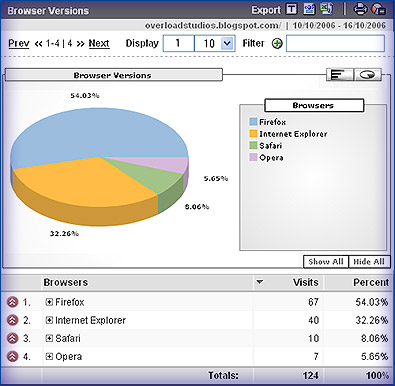
I was checking my blog statistics using Google Analytics and when checking the browser versions saw that as usual the browser that most of my visitors use is mozilla firefox what is actually logical if the main subject of my blog is digital media, so most of my visitors come here when searching for things related to technologies...
Just for curiosity, I wanted to know how some of my visitors, the ones using IExplorer (32.26% this week), where watching my blog finding out that not everything looks 100% what is in fact normal as all of us know, IExplorer doesn't support (yet!) many CSS features...
The eolas problem is ok, I actually don't mind if a person has to click first on a flash movie to activate it, but not showing some of the elements is a real problem, for instance my technorati's favourites widget, on IExplorer just doesn't show up. It can be a bug on blogger as for instance sometimes the navigation is missing (only if using IEexplorer) but anyway, is ok with me, there is nothing I can (nor want) to do about the 32.26% of visitors who use IExplorer, is not my fault if they are using a bad browser having so many options out there.


Salut!