I think this is the best widget I have built so far. As explained before, I built this widget for the Clicky competition and we won the first prize.
We?
I mentioned the help from my friend José Peña Pocasangre and in his blog he has a nice post about his approach to the problem and how he created the concept and cool graphics.
The widget shows the latest visitors statistics from your blog or website, collecting the data from Clicky and showing the top 7 of a respective category. The available options to show are:
- visitors top cities
- incoming links
- search engines
- downloads
- operative systems
- visitors top countries
- entrance pages
- web browsers
- search keywords
- exit pages
- pages
- searches
- languages
- screen resolutions
- incoming link domains
- outgoing links
This is an example:
To use it, you would need to register with Clicky, then you can get the widget from Clearspring and put it in your website.
Don't you think is cool? :)
Salut!
Showing posts with label Statistics. Show all posts
Showing posts with label Statistics. Show all posts
Saturday, September 15, 2007


Friday, August 17, 2007
And the widget winner is...
(title stolen from Daniel Todd's blog)
I mentioned before, I had built a widget for my new addiction and actually submitted it to a competition at:

guess what?
I WON THE FIRST PRIZE!
It was announced today at the Clicky blog; now I will tell you my secret on this one:
The concept and graphics were made by José Peña Pocasangre, a great Art Director based in Barcelona, Spain.
I told my friend "Penapoca" about the competition and immediately he started thinking about a concept, couple of days later he sent me the cool graphics and I just put them in flash, pulled the data from Clicky, added some animations and voila! a nice and customizable widget was in the way to the competition... the rest is history...
hey!
Thanks Clicky for the support! :D
Hopefully soon the widget will be available for distribution and definitely I will add it here to show you some of this website's statistics.
salut!
I mentioned before, I had built a widget for my new addiction and actually submitted it to a competition at:
guess what?
I WON THE FIRST PRIZE!
It was announced today at the Clicky blog; now I will tell you my secret on this one:
The concept and graphics were made by José Peña Pocasangre, a great Art Director based in Barcelona, Spain.
I told my friend "Penapoca" about the competition and immediately he started thinking about a concept, couple of days later he sent me the cool graphics and I just put them in flash, pulled the data from Clicky, added some animations and voila! a nice and customizable widget was in the way to the competition... the rest is history...
hey!
Thanks Clicky for the support! :D
Hopefully soon the widget will be available for distribution and definitely I will add it here to show you some of this website's statistics.
salut!
Monday, August 13, 2007
a widget for my new addiction
I do accept it, I've got a new addiction:
There are many tools out there to check out your website's statistics and most of them offer you the same options, however, Clicky has something that really makes checking statistics an addiction: the Clicky spy.
Of course my website doesn't have the traffic Clicky does but still I can check in real time who's visiting me and what my visitors are doing...
It's really cool to see how my visitors jump from page to page internally and click on external links, etc.
Another cool thing is that Clicky has its own API so developers can play with it an create widgets or similar stuff and these days they are running a contest for widgets developers; of course I've submitted a widget that I hope I will be using here as soon as the guys at Clicky allow me (I guess until they decide the contest winners, the submitted widgets should remain "hidden").
We will see how it goes :)
Click here to check a table with the differences between Clicky and "the other guys"
salut!
There are many tools out there to check out your website's statistics and most of them offer you the same options, however, Clicky has something that really makes checking statistics an addiction: the Clicky spy.
Of course my website doesn't have the traffic Clicky does but still I can check in real time who's visiting me and what my visitors are doing...
It's really cool to see how my visitors jump from page to page internally and click on external links, etc.
Another cool thing is that Clicky has its own API so developers can play with it an create widgets or similar stuff and these days they are running a contest for widgets developers; of course I've submitted a widget that I hope I will be using here as soon as the guys at Clicky allow me (I guess until they decide the contest winners, the submitted widgets should remain "hidden").
We will see how it goes :)
Click here to check a table with the differences between Clicky and "the other guys"
salut!
Sunday, February 25, 2007
Flash-PHP file downloads counter
If you want to keep a record and show how many times has a file been downloaded, you can use Flash, php and a simple txt file to hold the number of downloads.
When I finished my Firefox Screensaver, I showed it first at the spreadfirefox community, of course, without any way to count the downloads.
When I finally had the time to show it here on my blog, I was looking for a way to count the number of downloads but had the limitation that on this blog, as far as I know, is only possible to write "front-end" scripts and, as you know, without a server is not possible to have any downloads counter as there is no way to store any data.
However, using flash as front-end I can pull any data from anywhere behind the scenes and show it back on the same flash.
Then, if in case you want to create a file downloads counter, just follow these steps:
First of all, we will need 4 files,
- the file we want to be downloaded, usually a compressed .zip file
- theCounter.txt file which will store the downloads number
- the flash file to show the number of downloads and to allow people to download the file
- a php file which behind the scenes will manage the downloads counter and point to the right link to the file to be downloaded.
Let's start with the flash file:
- Open a new flash document
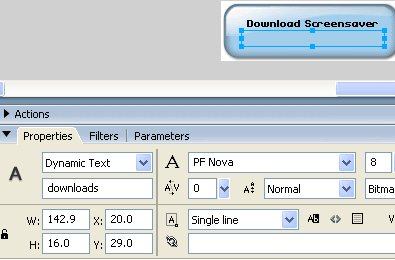
- Put on the stage all the graphics you need and also a dinamic text field which will show the number of downloads with an instance name of "downloads" as shown in the picture:
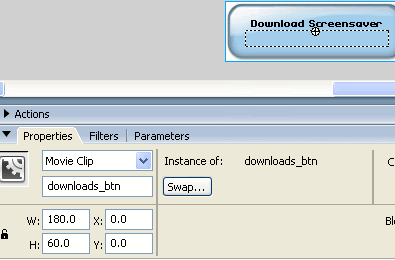
- Select the background image and press F8 to make it a movieclip, and put it as instance name "downloads_btn"
- On a different layer called "actions", write the following actionscript:
When pressing the button, we are calling a php which is the one in charge of the download and counter system.
On releasing the button, we load the variable again and as the file we are offering for download has been requested another time, the value of the variable loaded is bigger by one.
Save the file and publish it to have a swf file.
Now let's see the php:
- Open dreamweaver or any other php editor; even notepad can do the job.
- Write the following code:
I'm sorry this is an image but as I said before, blogger doesn't like back-end scripts and stripped it out when I wrote it here...
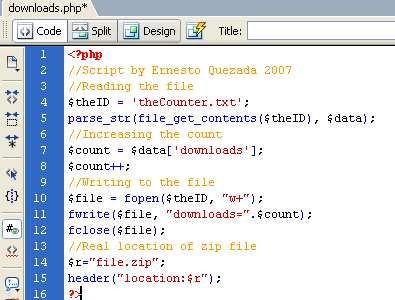 We are first opening theCounter.txt file, checking what it has inside and from it, the value of "donwloads" is stored in a variable called "count", then add one to this value, write the variable and the new value of it back to the txt file and closes it. Next we give the real location of the zip file and redirect the browser to it.
The .txt file has only one line inside:
downloads=X
where X is the current number of downloads, so the first time it should be 0 (zero).
That's it!
just upload everything to a server with php support and embed your swf where convenient.
For example, I embeded my swf on this post:
Try it, click on the button, download and install the screensaver, if you don't like you can always uninstall it :)
salut!
When I finished my Firefox Screensaver, I showed it first at the spreadfirefox community, of course, without any way to count the downloads.
When I finally had the time to show it here on my blog, I was looking for a way to count the number of downloads but had the limitation that on this blog, as far as I know, is only possible to write "front-end" scripts and, as you know, without a server is not possible to have any downloads counter as there is no way to store any data.
However, using flash as front-end I can pull any data from anywhere behind the scenes and show it back on the same flash.
Then, if in case you want to create a file downloads counter, just follow these steps:
First of all, we will need 4 files,
- the file we want to be downloaded, usually a compressed .zip file
- theCounter.txt file which will store the downloads number
- the flash file to show the number of downloads and to allow people to download the file
- a php file which behind the scenes will manage the downloads counter and point to the right link to the file to be downloaded.
Let's start with the flash file:
- Open a new flash document
- Put on the stage all the graphics you need and also a dinamic text field which will show the number of downloads with an instance name of "downloads" as shown in the picture:

- Select the background image and press F8 to make it a movieclip, and put it as instance name "downloads_btn"

- On a different layer called "actions", write the following actionscript:
// --- Function to load the stored number ---What is happening here is, first we are loading the variable stored in theCounter.txt file and to avoid the cache memory and load a fresh value everytime, we add a ?num=random(999) that gives us a unique value when calling the same file, that way the browser thinks you are loading a different file...
function loadingVars():Void {
var my_lv:LoadVars = new LoadVars();
my_lv.onLoad = function(success:Boolean) {
if (success) {
downloads.text = "( "+my_lv.downloads+" downloads )";
} else {
trace("Error loading/parsing LoadVars.");
}
};
my_lv.load("theCounter.txt?num="+random(999));
}
// --- Calling the function ---
loadingVars();
// --- Button actions ---
downloads_btn.onPress = function() {
getURL("downloads.php");
};
downloads_btn.onRelease = function() {
loadingVars();
};
When pressing the button, we are calling a php which is the one in charge of the download and counter system.
On releasing the button, we load the variable again and as the file we are offering for download has been requested another time, the value of the variable loaded is bigger by one.
Save the file and publish it to have a swf file.
Now let's see the php:
- Open dreamweaver or any other php editor; even notepad can do the job.
- Write the following code:
I'm sorry this is an image but as I said before, blogger doesn't like back-end scripts and stripped it out when I wrote it here...
 We are first opening theCounter.txt file, checking what it has inside and from it, the value of "donwloads" is stored in a variable called "count", then add one to this value, write the variable and the new value of it back to the txt file and closes it. Next we give the real location of the zip file and redirect the browser to it.
The .txt file has only one line inside:
downloads=X
where X is the current number of downloads, so the first time it should be 0 (zero).
That's it!
just upload everything to a server with php support and embed your swf where convenient.
For example, I embeded my swf on this post:
Try it, click on the button, download and install the screensaver, if you don't like you can always uninstall it :)
salut!
Tuesday, October 17, 2006
Blogger bugs on IE?
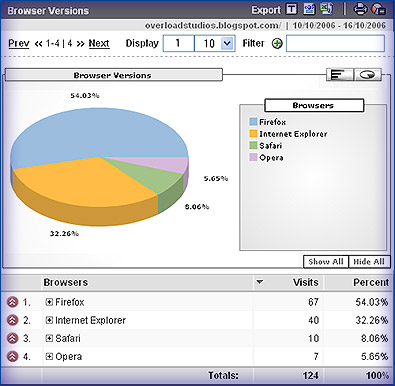
I was checking my blog statistics using Google Analytics and when checking the browser versions saw that as usual the browser that most of my visitors use is mozilla firefox what is actually logical if the main subject of my blog is digital media, so most of my visitors come here when searching for things related to technologies...
Just for curiosity, I wanted to know how some of my visitors, the ones using IExplorer (32.26% this week), where watching my blog finding out that not everything looks 100% what is in fact normal as all of us know, IExplorer doesn't support (yet!) many CSS features...
The eolas problem is ok, I actually don't mind if a person has to click first on a flash movie to activate it, but not showing some of the elements is a real problem, for instance my technorati's favourites widget, on IExplorer just doesn't show up. It can be a bug on blogger as for instance sometimes the navigation is missing (only if using IEexplorer) but anyway, is ok with me, there is nothing I can (nor want) to do about the 32.26% of visitors who use IExplorer, is not my fault if they are using a bad browser having so many options out there.
Salut!
Just for curiosity, I wanted to know how some of my visitors, the ones using IExplorer (32.26% this week), where watching my blog finding out that not everything looks 100% what is in fact normal as all of us know, IExplorer doesn't support (yet!) many CSS features...
The eolas problem is ok, I actually don't mind if a person has to click first on a flash movie to activate it, but not showing some of the elements is a real problem, for instance my technorati's favourites widget, on IExplorer just doesn't show up. It can be a bug on blogger as for instance sometimes the navigation is missing (only if using IEexplorer) but anyway, is ok with me, there is nothing I can (nor want) to do about the 32.26% of visitors who use IExplorer, is not my fault if they are using a bad browser having so many options out there.
Salut!
Subscribe to:
Posts (Atom)