I have just uploaded a widget to Widgipedia called "Subscrbe to my feed", erm... I know, the name is not that nice but I'm not that creative to put names to my widgets :P This is the description from Widgipedia:
Replace that old RSS button for this cool Flash button to promote your feed and allow your viewers to subscribe to your site with ease. Just put this widget into your blog (or any other page with a feed) and flash will do the rest.
Technically speaking, via javascript-actionscript it gets the URL where is embedded into and sends it to a php, this php searches through the html of the page and returns the RSS (if any), then is easier for the user to add your feed to any reader.
The original design was made by UtomBox and you can find it here, and this is the way it looks:
Subscribe to my feed
Click on the "get" button to grab it and embed it into your blog and of course, click on the widget itself to add my feed to your reader ;)
I remember when I started "blogging" I decided not to add any sort of adds as I thought they looked bad, they wouldn't add any good to my blog and anyway I didn't have many visits... nowadays I've got some more visits (more than a couple of thousands monthly) and even though I still think adds look bad, after reading so many stories about people who make money from them I decided to give them a try so I could pay a proper server to host all my experiments and make more interesting stuff mixing more technologies (PHP - MySQL - Flash) because at the moment I've got a very basic account without access to a database and millions of .txt files for some of my widgets users to store specific data (ie counters).
For about two months or so I tried an affiliate program and added some banners to the blog expecting some of my readers will click on them and buy some stuff... It happened that they clicked on the banners a couple of times but never bought anything, I guess it was because they where about UK based companies and most of my visitors are from other places.
Today I've decided to say goodbye to these "sponsors" as I didn't get any penny from them :D and I'm only leaving the old and worse looking Google adSense.
With that one is another story, I added it a couple of months ago and still don't understand why it shows some funny adds, not related at all with what I write about... I remember about a couple of weeks ago when I was about to say goodbye to them as well, someone clicked on one of the links and I got my first $0.15, then I decided to leave them, I don't know how long for as so far I have earned less than $0.50! :D
Well, anyway, affiliate programs are not for me, the banners where really annoying so I'm happy I got rid of them :)
If you want to keep a record and show how many times has a file been downloaded, you can use Flash, php and a simple txt file to hold the number of downloads.
When I finished my Firefox Screensaver, I showed it first at the spreadfirefox community, of course, without any way to count the downloads. When I finally had the time to show it here on my blog, I was looking for a way to count the number of downloads but had the limitation that on this blog, as far as I know, is only possible to write "front-end" scripts and, as you know, without a server is not possible to have any downloads counter as there is no way to store any data.
However, using flash as front-end I can pull any data from anywhere behind the scenes and show it back on the same flash.
Then, if in case you want to create a file downloads counter, just follow these steps:
First of all, we will need 4 files, - the file we want to be downloaded, usually a compressed .zip file - theCounter.txt file which will store the downloads number - the flash file to show the number of downloads and to allow people to download the file - a php file which behind the scenes will manage the downloads counter and point to the right link to the file to be downloaded.
Let's start with the flash file:
- Open a new flash document - Put on the stage all the graphics you need and also a dinamic text field which will show the number of downloads with an instance name of "downloads" as shown in the picture:
- Select the background image and press F8 to make it a movieclip, and put it as instance name "downloads_btn"
- On a different layer called "actions", write the following actionscript:
// --- Function to load the stored number --- function loadingVars():Void { var my_lv:LoadVars = new LoadVars(); my_lv.onLoad = function(success:Boolean) { if (success) { downloads.text = "( "+my_lv.downloads+" downloads )"; } else { trace("Error loading/parsing LoadVars."); } }; my_lv.load("theCounter.txt?num="+random(999)); } // --- Calling the function --- loadingVars(); // --- Button actions --- downloads_btn.onPress = function() { getURL("downloads.php"); }; downloads_btn.onRelease = function() { loadingVars(); };
What is happening here is, first we are loading the variable stored in theCounter.txt file and to avoid the cache memory and load a fresh value everytime, we add a ?num=random(999) that gives us a unique value when calling the same file, that way the browser thinks you are loading a different file... When pressing the button, we are calling a php which is the one in charge of the download and counter system. On releasing the button, we load the variable again and as the file we are offering for download has been requested another time, the value of the variable loaded is bigger by one. Save the file and publish it to have a swf file.
Now let's see the php:
- Open dreamweaver or any other php editor; even notepad can do the job. - Write the following code: I'm sorry this is an image but as I said before, blogger doesn't like back-end scripts and stripped it out when I wrote it here...
We are first opening theCounter.txt file, checking what it has inside and from it, the value of "donwloads" is stored in a variable called "count", then add one to this value, write the variable and the new value of it back to the txt file and closes it. Next we give the real location of the zip file and redirect the browser to it.
The .txt file has only one line inside: downloads=X where X is the current number of downloads, so the first time it should be 0 (zero). That's it! just upload everything to a server with php support and embed your swf where convenient. For example, I embeded my swf on this post:
Try it, click on the button, download and install the screensaver, if you don't like you can always uninstall it :)
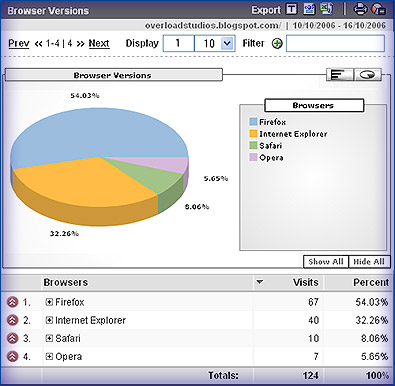
I was checking my blog statistics using Google Analytics and when checking the browser versions saw that as usual the browser that most of my visitors use is mozilla firefox what is actually logical if the main subject of my blog is digital media, so most of my visitors come here when searching for things related to technologies... Just for curiosity, I wanted to know how some of my visitors, the ones using IExplorer (32.26% this week), where watching my blog finding out that not everything looks 100% what is in fact normal as all of us know, IExplorer doesn't support (yet!) many CSS features... The eolas problem is ok, I actually don't mind if a person has to click first on a flash movie to activate it, but not showing some of the elements is a real problem, for instance my technorati's favourites widget, on IExplorer just doesn't show up. It can be a bug on blogger as for instance sometimes the navigation is missing (only if using IEexplorer) but anyway, is ok with me, there is nothing I can (nor want) to do about the 32.26% of visitors who use IExplorer, is not my fault if they are using a bad browser having so many options out there.