Sunday, February 25, 2007

Flash-PHP file downloads counter

If you want to keep a record and show how many times has a file been downloaded, you can use Flash, php and a simple txt file to hold the number of downloads.

When I finished my Firefox Screensaver, I showed it first at the spreadfirefox community, of course, without any way to count the downloads.
When I finally had the time to show it here on my blog, I was looking for a way to count the number of downloads but had the limitation that on this blog, as far as I know, is only possible to write "front-end" scripts and, as you know, without a server is not possible to have any downloads counter as there is no way to store any data.

However, using flash as front-end I can pull any data from anywhere behind the scenes and show it back on the same flash.

Then, if in case you want to create a file downloads counter, just follow these steps:

First of all, we will need 4 files,
- the file we want to be downloaded, usually a compressed .zip file
- theCounter.txt file which will store the downloads number
- the flash file to show the number of downloads and to allow people to download the file
- a php file which behind the scenes will manage the downloads counter and point to the right link to the file to be downloaded.

Let's start with the flash file:

- Open a new flash document
- Put on the stage all the graphics you need and also a dinamic text field which will show the number of downloads with an instance name of "downloads" as shown in the picture:


- Select the background image and press F8 to make it a movieclip, and put it as instance name "downloads_btn"


- On a different layer called "actions", write the following actionscript:
// --- Function to load the stored number ---
function loadingVars():Void {
var my_lv:LoadVars = new LoadVars();
my_lv.onLoad = function(success:Boolean) {
if (success) {
downloads.text = "( "+my_lv.downloads+" downloads )";
} else {
trace("Error loading/parsing LoadVars.");
}
};
my_lv.load("theCounter.txt?num="+random(999));
}
// --- Calling the function ---
loadingVars();
// --- Button actions ---
downloads_btn.onPress = function() {
getURL("downloads.php");
};
downloads_btn.onRelease = function() {
loadingVars();
};
What is happening here is, first we are loading the variable stored in theCounter.txt file and to avoid the cache memory and load a fresh value everytime, we add a ?num=random(999) that gives us a unique value when calling the same file, that way the browser thinks you are loading a different file...
When pressing the button, we are calling a php which is the one in charge of the download and counter system.
On releasing the button, we load the variable again and as the file we are offering for download has been requested another time, the value of the variable loaded is bigger by one.
Save the file and publish it to have a swf file.

Now let's see the php:

- Open dreamweaver or any other php editor; even notepad can do the job.
- Write the following code:
I'm sorry this is an image but as I said before, blogger doesn't like back-end scripts and stripped it out when I wrote it here...

We are first opening theCounter.txt file, checking what it has inside and from it, the value of "donwloads" is stored in a variable called "count", then add one to this value, write the variable and the new value of it back to the txt file and closes it. Next we give the real location of the zip file and redirect the browser to it.

The .txt file has only one line inside:
downloads=X
where X is the current number of downloads, so the first time it should be 0 (zero).
That's it!
just upload everything to a server with php support and embed your swf where convenient.
For example, I embeded my swf on this post:


Try it, click on the button, download and install the screensaver, if you don't like you can always uninstall it :)

salut!

Saturday, February 24, 2007

Submit to StumbleUpon flash button

I've just uploaded a new WebWidget to Widgipedia: "Submit to StumbleUpon flash button"
Integrate your site with Stumbleupon; Adding this widget allows people to submit a story from your blog or any other personal website to Stumbleupon for others to discover.
StumbleUpon is a great way to find websites that are really interesting for you as they have been submitted to the database into different categories, you subscribe only to the categories you like. It's so addictive that my del.icio.us account is growing thanks to the cool stuff I discover when I "Stumble".

If you already have an account with them and have a blog, why not adding this widget:


Tested already by submitting this page to StumbleUpon!
Get it from Widgipedia.

Salut!

Friday, February 23, 2007

LFPUG February 07 meeting


lfpug0207-01, originally uploaded by Ernesto Quezada.

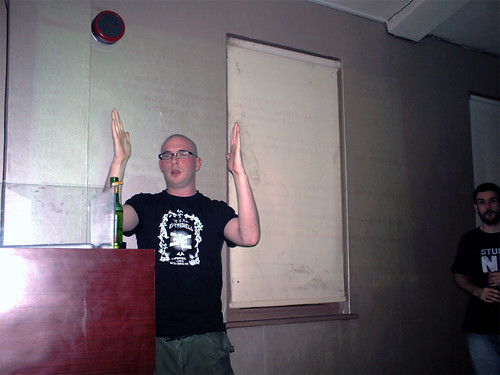
Alias Cummins presenting at the London Flash Platform Users Group meeting last night.

We had two great presentations yesterday night; the first one, Alias showed us some cool stuff he has done experimenting with filters, bitmaps, and some other classes. He explained us how all this special filters and stuff comes from the same root: Perlin noise. In the end he showed us some code that looks simple but complex at the same time, using Maths and other crazy stuff.

The second presentation was in hands of Dan Thomas on Apollo. After explaining us some things about the legendary Apollo soon to be released (hopefuly), there was a debate about how good is Apollo and why should anyone choose it instead of for example JAVA? I think Emmanuel raised a good point when saying we are following too much Adobes press that even we are doing much more marketing than them. Very true!
Anyway, for desktop applications, I preffer to continue using MDM Zinc, a much more mature tool to develop desktop RIAs.

And the best part of the meeting, for me of course, I was AGAIN the lucky winner of a book!
This time is Richard Leggett's FLASH APPLICATIONS FOR MOBILE DEVICES that of course I started reading already.

Thanks Richard for the personalized autograph!

Salut!

Sunday, February 18, 2007

Game: Blitzkrieg - Lightening War


I was following a tutorial on Creating a Vertical Shooter that I wrote a while back (more than a year ago)
- creating-vertical-shooter-part-I
- creating-vertical-shooter-part-II
- creating-vertical-shooter-part-III
When I wrote it, I made Pawel and the Flying Dragons; this time I made a new game:
Blitzkrieg - Lightening War

The actionscript I used is basically the same, just changed the graphics and added a couple of things like a shotgun and an enemys bomb. This is a probe that any script can be re-used and it has to be made thinking about it, some basic rules in Object Oriented Programming (Polymorphism and Inheritance).

The scoretable is almost empty so, go for it ;)

PD: Don't ask me what's that of a tank shooting anti-aircraft, hey! at least this time there are no flying dragons...

Sunday, February 11, 2007

Take back the web & the desktop!

Firefox ScreenSaver


To help to spread the SFx community and Mozilla Firefox at the same time, I've done a ScreenSaver that shows the Firefox downloads in a different way.

The idea behind is to reach 1 Billion downloads (now is a bit more of a quarter of billion) and show it as a full Firefox logo.
So far if you leave the screensaver running, it shows just 1/3 of the logo as only 1/3 of a billion has been downloaded as per today (11/Feb/2007) and this third of billion is slowly uncovered by squares (the data collected is transformed into squares, each square represents 200,000 downloads)...

well, better if you check it by yourself :)


salut!

Saturday, February 10, 2007

Flash Counter Widget goes coloured


The Flash Web Counter
widget has found a wide acceptance in the Widgetbox users community.
Shown in the top rated list as the highest rated is a big honour for me and from the 10 widgets I have uploaded to Widgetbox, is by far the one with more subscriptions.
One of its goodness is the small control panel where you can reset the counter to any convenient number and from today its possible as well change the counters background colour!

There is a number of files involved in the process for this widget to work:
- The flash counter itself
- An individual text file for each counter to store number of visits and selected colour (one text file per user)
- A php file that gets the current value of the counter and adds one more visit when required
- The Flash Control Panel
- A php file to get and set the values of both colour and number of visits.

All these 5 files have been updated today in order to have the option of changing the counters background colour. I know it would have been better to have a MySQL database instead of the hundreds of single text files I have currently but my hosting plan is very basic...

Anyway, don't be shy and leave your comments-feedback here ;)

Thursday, February 01, 2007

Widget: Thunderbird Contact Form

I just uploaded a new web widget on Widgetbox.
from its page:
A simple contact form that promotes Mozilla Thunderbird. Let your visitors contact you giving them the option of sending you messages or get your contact details, ie mobile phone number and email address.
If you want to contact me, test it from here but as well I invite you to go and test it from Widgetbox


Available from:
http://www.widgetbox.com/widget/thunderbird-contact-form
Yes, I use Mozilla Thunderbird and this is my tribute to it.

Salut

Wednesday, January 24, 2007

web widgets on the widgipedia


Some days ago, widgipedia announced the opening of their new section: web widgets.
We have promised that we'd create the ultimate widgets resource, so today we've taken one step closer to this goal by merging the two worlds: desktop widgets AND web widgets are all together at Widgipedia.
as some of my web widgets were not compatible with widgetbox, I gave them a try on widgipedia and luckily for me they all work like a charm!
So far I have uploaded three of them:

- Add to bloglines flash button
- Add to delicious flash button
- Add to netvibes flash button

So, if you are looking for some cool web widgets, you can also visit the widgipedia and if you have any request, comment, suggestion, idea, etc. I'm happy to read it.

salut!

Tuesday, January 16, 2007

Desktop widget: CPU usage


I need feedback on one of my latest desktop widgets.
This standalone desktop widget for windows doesn't require installation. The following description is taking from the widgipedia where the widget is hosted:
Bars and numbers showing the percentage of your CPU Usage. No installation needed. Stays on top of all other windows allowing you to see the resources request from different applications. Press Esc key to close it.
One person has left his feedback saying it doesn't work; so please if you can try it and leave comments about it either here or on its webpage telling me whether it works or not, would be really appreciated.

Thanks!

Sunday, January 14, 2007

widgets: yeah, I changed my mind...

more than a month ago, I wrote "My widgets on widgetbox" where I said I wouldn't write about my widgets on this blog anymore.

Well, actually I changed my mind as I have decided to continue writing about them and is because of many reasons:
- Feedback: I can get feedback, comments, suggestions and requests
- QA: To test them and to see how they look like when published on a blog
- Incompatibility: Some of the widgets I've done or updated are not compatible with widgetbox
- Promotion: I want my widgets to be used by other people so I need to let people know about them
- Personal: To use my blog :P (writing is a good habit and specially for me as English is not my mother tongue...)

so, to catch up I will write a short list of the web widgets I've done and I haven't mentioned here:
- Mini del.icio.us hotlist: shows hotlist from the del.icio.us homepage
- Flash Date Calendar: simple flash calendar with digital clock
- Firefox Digital Clock: firefox download counter and digital clock
- Digital Time and Date: simple digital clock and date (74 subscriptions so far)
- Flash web counter: website visits counter (123 subscriptions so far)

So far, I have submited 9 web widgets to widgetbox and all of them are doing well; I have many more ideas but haven't got the time but from now on, I will continue writing about them here on my blog.

Salut!

Monday, January 08, 2007

Hi5?


The other day I had a bit of spare time and while working on my Firefox-Calendar desktop widget, I managed to update my hi5 account.
At last! after many times trying to open the buggy website I could use the old "features" and check the new ones.
One of the things that I liked is that you can use flash now and as a test I put my Flash Skype Status button on it.
I don't know why in Latin America hi5 is so popular, many people preffers it rather than mySpace for instance and my sister is one of them, who is always sending me messages from it; but one of the things I don't like is that kind of force you to start a blog as many other websites do nowadays and I find useless to start blogs that I won't be able to update and will be there left dusty and rusty...

Anyway, for me having emigrated so far, hi5 is a good way to see how my relatives are doing as I haven't seen some of them for almost 5 years...

ok, time to go home :)

salut!

Monday, January 01, 2007

Happy 2007

2006 has gone. Was actually a very good year for me. It was exactly a year ago that I started blogging again.
Apart from the changes on my personal life, last year on this blog I wrote 66 posts that makes an average of 5.5 posts per month and 62 comments from my visitors, I started the year posting about my games and finished talking about my widgets.
Yeah, definitely a good year.
Now let's see what 2007 brings.

hey!
Happy New Year to all of you!

salut!

Saturday, December 30, 2006

My first desktop widget!


Some time ago I asked the guys at the Widgipedia to open a section for web widgets but as the Widgipedia is still in beta, they told me:
Flash widgets are coming soon, as part of our goal to host "the best widgets and gadgets across any platform"
so I continue with my web widgets and put them in Widgetbox.
On the last day at Flash on The Beach I was the lucky winner of a MDM Zinc copy which allows you to create desktop applications from flash including screensavers and WIDGETS!
So I did my very first desktop widget today, after few days trying to understand the tool that for any strange reason doesn't like vector images... and uploaded it to the Widgipedia!

It is a very simple Skype Analogue Clock but I think is cool, specially because is my first desktop widget :)

Salut!

Thursday, December 28, 2006

in the top 5!

Alex Iskold from AdaptiveBlue, has posted on his blog the top 5 widgets every blogger must have and to my supprise, one of my widgets is in the list!
The post R/WW Christmas - Widgets, not Cheese is mainly a tutorial on how to install and use widgets from widgetbox but has as well many interesting points about the importance and use of web widgets.
I know I promissed not to write about my widgets on this blog, but hey! I'm really exited to know that my Flash mini Digg viewer is a must have!
I'm already working on a 2007 version of it, so if you have any suggestion, I'm all ears (well, eyes...)


salut!

Monday, December 25, 2006

Barcelona


PICT0046, originally uploaded by ernesto.quezada.

Last week, Ewa (my partner) and me went to Barcelona for a week. It was just great!
Eventhough it was a bit cold but the beauty of the city let us walk through all the streets we could.
It was so cool that I even want to move over there!
we will see...

Salut!

Saturday, December 09, 2006

my widgets on widgetbox


I've decided to stop posting about my little experiments -widgets, eventhough I think is important for me too keep a record of what I was experimenting with and when... as for instance playing with php to get rid of the XML crossDomain policies was a good fun and for sure something new will come accross when continuing experimenting with flash and other technologies; I might post something about the solutions if any.
So, if anyone is looking for my widgets, they are available at Widgetbox, although the ones I've released here will continue working as usual.
You can see my widgets from this link.
I hope you like them and if you have any comments or suggestions, I will be very happy to read them ;)

Salut!

Sunday, December 03, 2006

Off to Flash on the Beach!


In few hours I will be heading to Victoria Station in Central London to get a train to Brighton, where Flash on the Beach will take place.
For those of you who don't know what Flash on the Beach is, quoted from their website:
Flash on the Beach conference is the first major Flash conference in the UK for over 6 years! Over 40 of the world's most talented Flash designers, developers and artists presenting on 3 tracks over 3 full days with mixer get togethers each morning and evening for essential networking opportunities.
For the next three days I will be attending different sessions related to new media and specially flash!
CamCorder ready, some miniDV tapes on my bag, off I go...

Saturday, December 02, 2006

LFPUG November Meeting


6:30pm, Daniel Todd and me said goodbye to all our colleagues at work as both of us were heading to the London Flash Platform Users Group November edition and after a long weekend we both are heading to the Flash On The Beach conference so we won't be at the office for almost a week!
No Flash Developers in the office for almost a week? oh Jesus!
well, is for the good of the company that we are going to all these events as we can apply all our knowledge to the applications we make!
Anyway, we got to Play, the usual pub in Old Street, when the first conference had already started. A great presentation from Adam Robertson on Linux and Flash, where he showed us all the power of the open source technologies and how we can create flash applications, including flex-MXML, using only free open source tools.
After the presentation he gave us a copy of UBUNTU, the most human friendly Linux distribution so far.
A couple of beers later, Stefan Richter gave us a presentation on the new fullScreen features introduced on the new Flash Player 9. Showing us nice examples and good practices on how to use this feature, Stefan closed the November sesion and as usual, all the troop headed to the nearest pub to continue the chat mostly about the big event Flash On The Beach.
Was nice to see you guys and hopefully we will have a great time next week!
I can't wait! :)

salut

Friday, November 24, 2006

Flash Firefox Downloads counter widget

For a flash web counter, please follow this link.

The next one of my flash web widgets series is a Firefox 2 Downloads Counter with an analogue clock.
Again, I had to deal with CrossDomain policies as flash cannot load any XML if the domain where the swf lives is not allowed to.
Instead of writing to the mozilla fundation and asking them to either host my swf or to allow my domain to get the XML data from them, I tricked these policies getting the data on a php and loading this php onto my flash file as I did with my Skype Status Flash Button.
Well, to the point...
For those of you who want to use this widget, just copy and paste this code onto your html page:

<object classid="clsid:d27cdb6e-ae6d-11cf-96b8-444553540000" id="firefox_clock" width="120" codebase="http://fpdownload.macromedia.com/pub/shockwave/cabs/flash/swflash.cab#version=7,0,0,0" height="240" align="middle">

<
param value="always" name="allowScriptAccess"/>
<
param value="http://overloadstudios.co.uk/ewa/firefox_clock.swf" name="movie"/><param value="high" name="quality"/><param value="transparent" name="wmode"/><embed pluginspage="http://www.macromedia.com/go/getflashplayer" quality="high" allowscriptaccess="always" align="middle" type="application/x-shockwave-flash" height="240" src="http://overloadstudios.co.uk/ewa/firefox_clock.swf" width="120" wmode="transparent" name="firefox_clock"/>
<
/embed></object>


Example:


hope you like it.
salut!

Wednesday, November 22, 2006

Flash Skype Analogue Clock

From the Skype Status Flash Button came the idea of having your Skype status shown on an analogue clock. So there it is, your skype status shown in the middle of this Skype Clock.
If you click on it, your Skype application will open giving you the option to start a conversation with me (or the person hosting the clock...)
Feel free to put it on your website, just copy and paste the following code on your html:

<object classid="clsid:d27cdb6e-ae6d-11cf-96b8-444553540000" id="skype_clock" width="96" codebase="http://fpdownload.macromedia.com/pub/shockwave/cabs/flash/swflash.cab#version=7,0,0,0" height="96" align="middle">

<
param value="always" name="allowScriptAccess"/>
<
param value="http://overloadstudios.co.uk/ewa/skype_clock.swf?myID=yourSkypeID" name="movie"/><param value="high" name="quality"/><param value="transparent" name="wmode"/><embed pluginspage="http://www.macromedia.com/go/getflashplayer" quality="high" allowscriptaccess="always" align="middle" type="application/x-shockwave-flash" height="96" src="http://overloadstudios.co.uk/ewa/skype_clock.swf?myID=yourSkypeID" width="96" wmode="transparent" name="skype_clock"/>
<
/embed></object>

As the previous Skype Status Flash Button, the only change you will need to do is to replace "yourSkypeID" for your skype user name or ID (allowing before your status to be shown)
Preview:


Enjoy!